
Bright Data proxy vs Insocks: how the two compare
Bright Data proxy is a large web data platform with residential, ISP, datacenter and mobile IP networks, billed per GB or per IP across 195+ countries. Insocks runs a smaller, SOCKS5-first service on US ISP addresses with documented UDP support and per-IP pricing. The two differ in scope, protocol depth and billing unit, not price alone. Data as of August 2026.
Legend used in every table below: ✅ documented by the vendor · ❌ not offered or not documented · ⚠️ documented with limits · 💡 practical tip. No other marks are used on this page.
Why these two are not the same kind of product
These providers solve different problems, so lining them up row by row without saying so would mislead. Bright Data proxy spans residential, ISP, datacenter and mobile networks, plus scraping APIs and datasets. Insocks focuses on proxy access itself, SOCKS5, residential, mobile, static and UDP IPs, with no scraping API layer. Rows below reading "Not applicable, different product scope" reflect a real gap, not a missing data point. 💡 Two tools built for adjacent, separate jobs.
Bright Data proxy vs Insocks: comparison summary
Comparing the two starts with scope: one runs a wide, multi-product proxy network, the other sells a narrower, protocol-focused stack. Bright Data and Insocks differ enough here that the table below is worth reading closely before later sections cover targeting, protocols and billing. The Insocks lineup is published as separate product pages: residential, ISP, static, mobile and UDP proxies.
| Criterion (data as of August 2026) | Bright Data | Insocks |
|---|---|---|
| Product scope | Residential, ISP, datacenter, mobile, scraping APIs | Residential, mobile, static, ISP, UDP |
| Proxy types | 4 network types | 5 types, SOCKS5-first |
| Protocols and UDP | SOCKS5 ✅, UDP ⚠️ not published | SOCKS5 ✅, UDP ✅ documented |
| Billing unit | Per GB or per IP | Per IP on a 24-hour term, rotation configurable |
| Targeting levels | Country, state, city, ZIP, ASN | US coverage, selection at IP level |
| Entry threshold | From $8 per GB list, $4.00 per GB promo | From $0.40 per IP, 24h |
Data as of August 2026, taken from each provider’s own pricing page, and worth checking before trusting any Bright Data proxy shortlist at face value. A wide scope is not automatically the right fit, and a narrow one is not automatically weaker. Open the proxy network pricing page to confirm the entry tier on the day you read this.
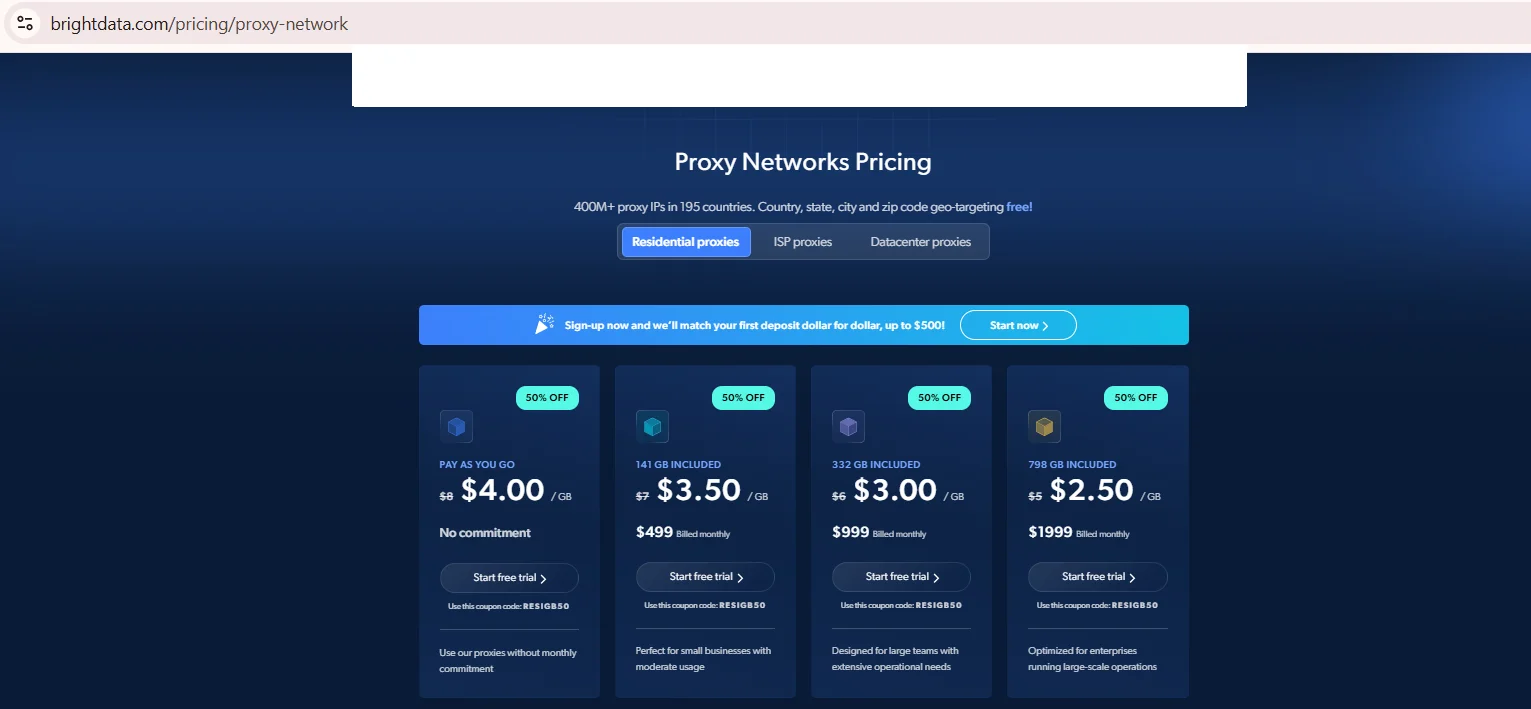
Source: Proxy Networks Pricing, brightdata.com, screenshot taken 20.08.2026
Proxy types and geo-targeting
Four network types are documented on one side, five on the other, and the count alone signals different priorities. Bright Data draws on a 400M+ residential IP pool refreshed monthly, sourced through an opt-in program with compensated participants, and that figure should be read as a vendor statement rather than an audited number. Insocks builds its pool from real US ISP-assigned addresses, screened against fraud score and blacklist databases before anything goes live, and the same reputation check is available to customers through the proxy score tool. Anyone shortlisting the best residential proxies for a US-only project weighs reach against depth from the very first search.
| Targeting level (data as of August 2026) | Bright Data | Insocks |
|---|---|---|
| Country | ✅ 195 countries | ⚠️ US-focused |
| State or region | ⚠️ where supported | ❌ not published |
| City | ✅ documented | ❌ not published |
| ZIP code | ✅ US only, free | ❌ not published |
| ASN or carrier | ✅ config-dependent | ⚠️ ISP filter only |
According to the official docs, Bright Data’s own residential proxy documentation lists country, state, city, ZIP code and ASN or carrier targeting, confirmed there, not on a homepage banner. Country-level IP counts are published separately on the locations page.
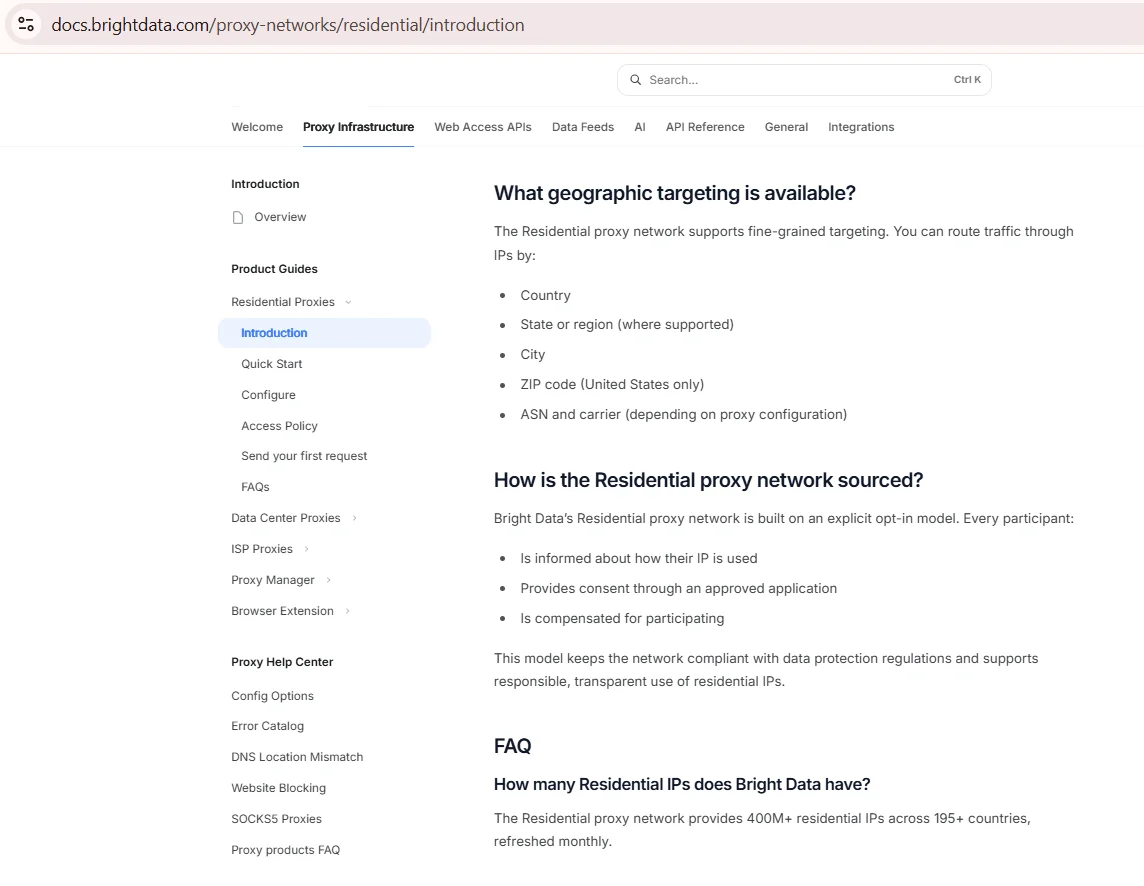
Source: Introduction to Residential proxies, docs.brightdata.com, screenshot taken 20.08.2026
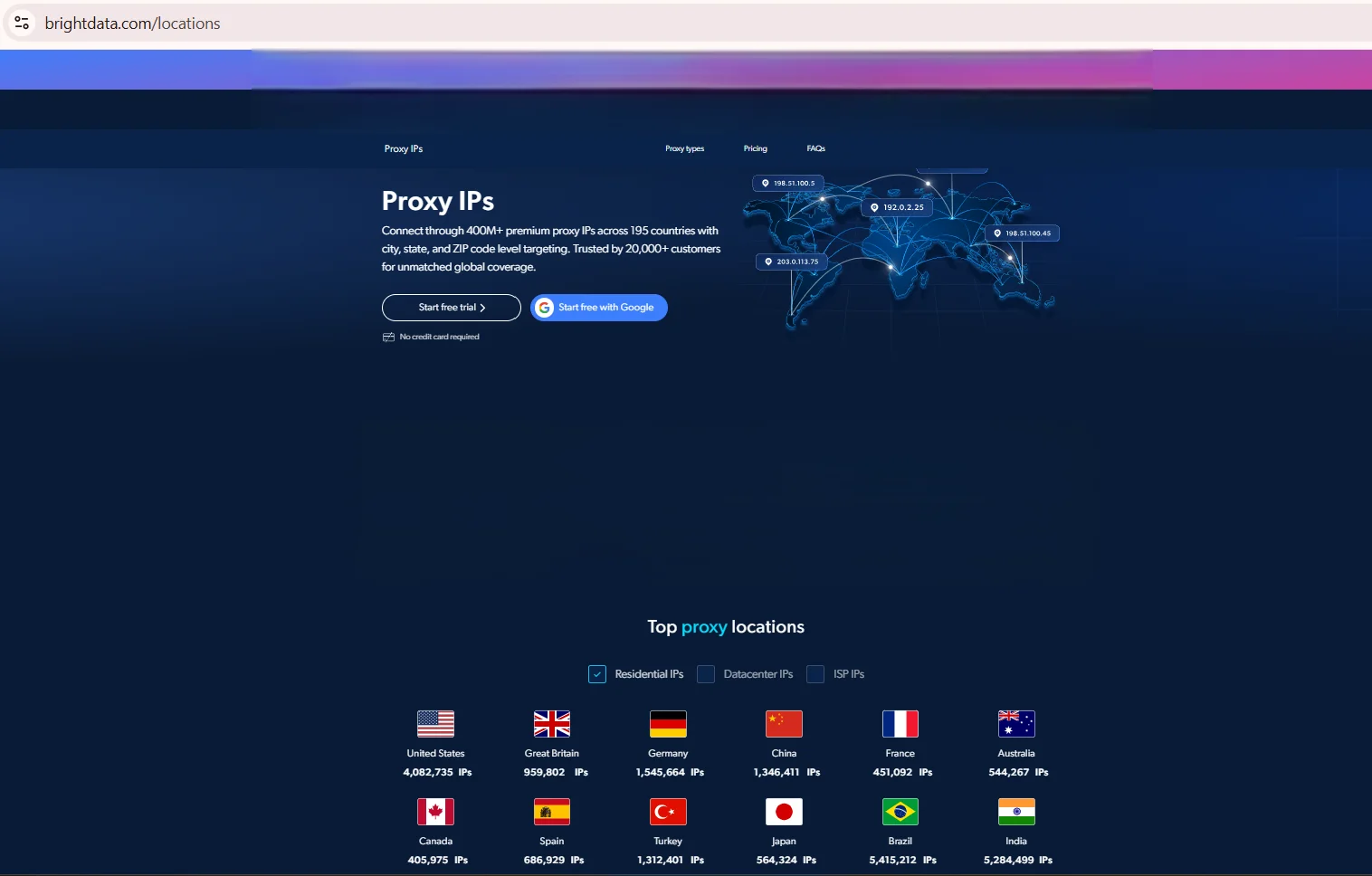
Source: Proxy IPs, brightdata.com, screenshot taken 20.08.2026
Protocol support: HTTP(S), SOCKS5 and UDP
HTTP(S) proxies cannot carry UDP traffic, so real-time use, gaming or streaming, needs the SOCKS5 protocol with UDP ASSOCIATE actually enabled, not just listed as a feature. Bright Data confirms SOCKS5 support through a Proxy Manager, yet UDP support is not called out on the public pages checked. Insocks publishes UDP support on its dedicated UDP proxy page, where SOCKS5 UDP is listed as the native datagram transport. Whether that counts as a real SOCKS5 residential proxy for latency-sensitive work depends entirely on the UDP question above, and what the protocol generations actually change is covered in our guide to SOCKS4 vs SOCKS5.
- ✅ Insocks: SOCKS5 UDP documented on the dedicated UDP proxy page, native datagram transport
- ⚠️ Larger network: SOCKS5 confirmed, UDP not published
- 💡 Check the docs page for UDP, not the homepage
Skipping this check is how teams learn the hard way, mid-project, that the protocol assumed was never actually confirmed for that particular SOCKS5 residential proxy.
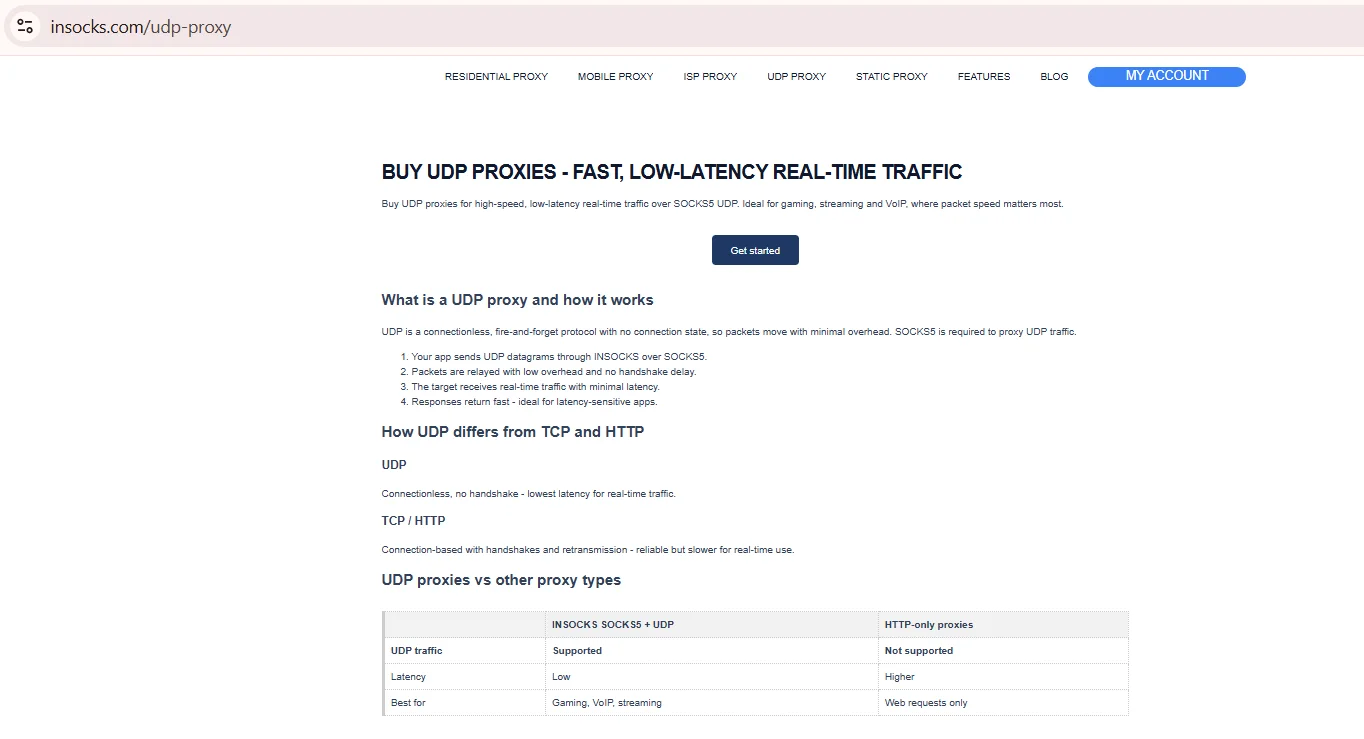
Source: UDP Proxies, insocks.com, screenshot taken 20.08.2026
Rotation, sticky sessions and session control
A sticky session simply keeps the same exit IP for a set window instead of rotating on every single request, and that matters most for logins and multi-step flows. Insocks sells each proxy on a 24-hour term with optional daily auto-renewal on the same port, while the rotation mode itself is published as per-request, timed or sticky. Rotation policy differs by provider, and knowing the default before signing up avoids surprises mid-project. Bright Data treats rotation as the default inside its residential network, with sticky sessions available as an opt-in setting through the dashboard. Which of the two shapes fits a given workload is the subject of a separate guide to static vs rotating proxies.
- ✅ Bright Data: rotating by default, sticky sessions configurable
- ✅ Insocks: 24-hour purchase term, rotation per request, timed or sticky
- ⚠️ Neither publishes a max sticky session length beyond these defaults
Session limits matter once a workflow needs hours instead of minutes.
Pricing and billing models
Billing differs sharply between the two, per GB on one side and per IP on the other, with custom terms layered in for Insocks. The pay-as-you-go rate starts at $8 per GB list price, shown with a $4.00 promotional rate under a discount code at this check, both taken from the residential proxy pricing page in August 2026. Bright Data pricing scales down toward $2.50 per GB at the highest monthly tier, billed near $2,000 a month. Insocks starts SOCKS5 pricing from $0.40 per IP for a 24-hour proxy, shifting by freshness and location, with current terms published on each product page.
| Billing model (data as of August 2026) | Unit | What to check |
|---|---|---|
| Residential (Bright Data) | $/GB, promo vs list | Confirm if a discount code is active |
| ISP or datacenter (Bright Data) | $/IP per month | Check tier breaks at 10, 100, 500, 1000 IPs |
| Insocks | $/IP, custom billing | Confirm current base price, listed as dynamic |
How to compare across billing models: normalize both to one scenario, say 20 GB monthly. At $2.50 to $4.00 per GB, that scenario lands between $50 and $80. Insocks bills per IP, so a fair read needs an estimate of IPs a 20 GB workload would use. That is why any Bright Data pricing comparison needs a short test, not just a guess from price per gb alone. Ordering steps on our side are walked through in buying a proxy.
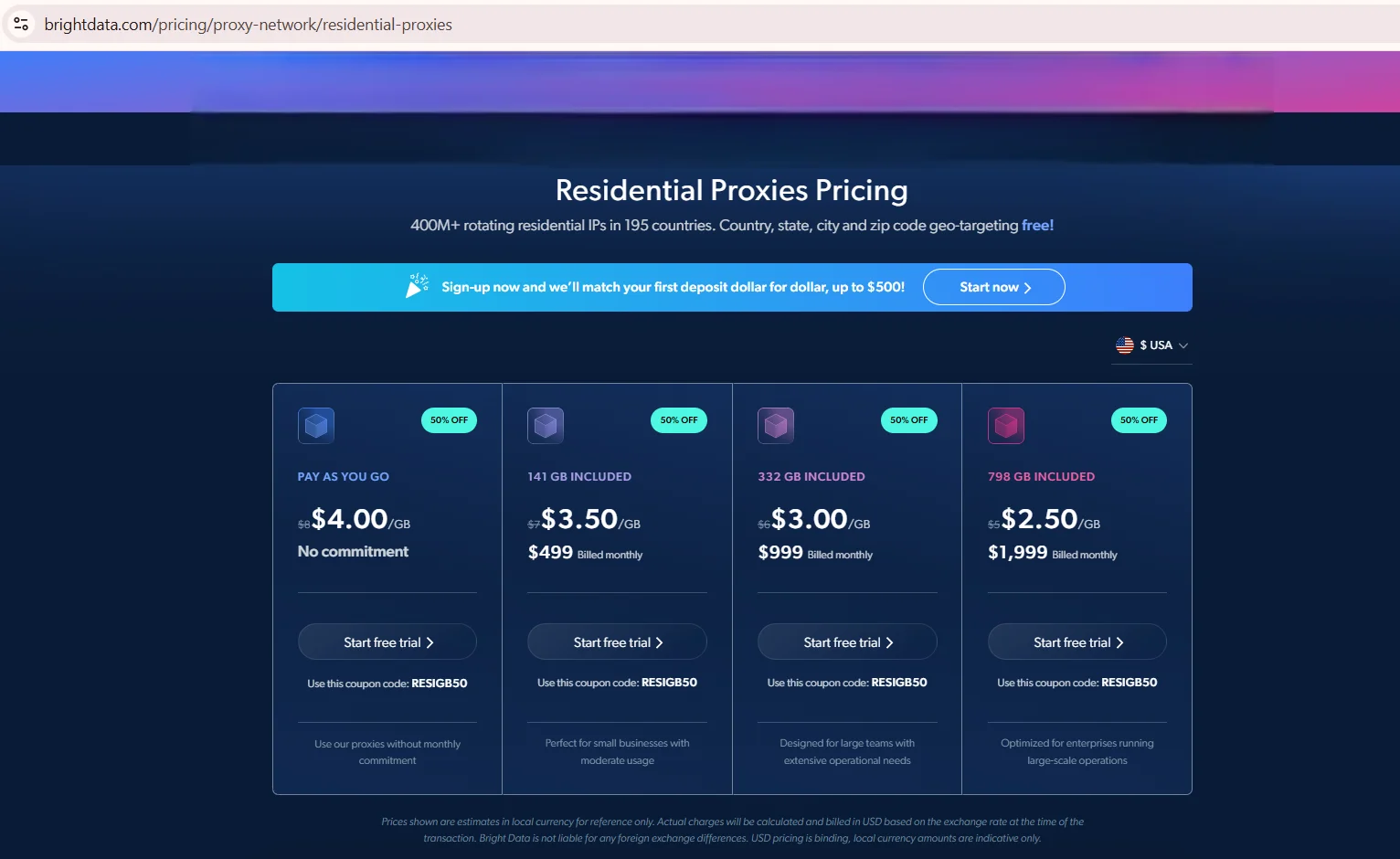
Source: Residential Proxies Pricing, brightdata.com, screenshot taken 20.08.2026
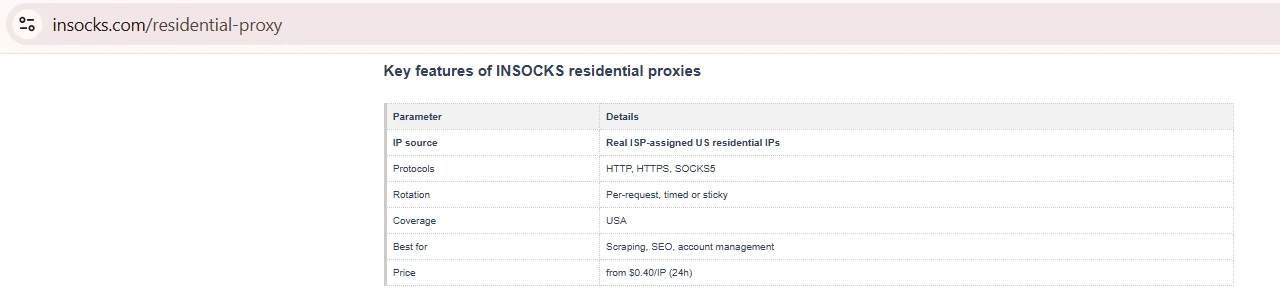
Source: Residential Proxies, insocks.com, screenshot taken 20.08.2026
Dashboard, API and what to check before you buy
Both providers offer account dashboards and api access, though documentation depth differs. One proxy dashboard includes a Proxy Manager, spend limits, and a KYC step before residential access unlocks fully. Insocks promises instant activation with full API access from signup, plus a history log and a no-logs policy. Bright Data deserves the same checklist as Insocks before payment.
- ✅ Authentication documented (login/password or token)
- ✅ Public API documentation available
- ✅ Connection details exportable from the dashboard
- ⚠️ Concurrent session limits, confirm current numbers
- ✅ Refund policy published
Skipping this checklist is why limits surface only after a plan is active. The parameters worth weighing before you pick a plan are listed in our proxy selection criteria.
Support and documentation
Support channels differ noticeably between the two, and that shows in daily availability. Insocks runs support through Telegram at all hours, plus a ticket system for refund and technical claims. Neither publishes a formal SLA tied to compensation on the pages checked, so that line reads Not published for both. Bright Data lists round-the-clock support with an account manager on higher tiers, backed by a more formal docs site.
A short support test during a trial tells more than either homepage will.
Which configuration fits which task
Matching the configuration to the task matters more than matching a brand to some shortlist. A rotating residential pool billed per GB fits large-scale scraping across many domains. A SOCKS5 setup with documented UDP fits real-time apps, gaming traffic or jitter-sensitive tasks. A static IP per month fits long-lived logins that need the same fingerprint daily, from either Bright Data proxy infrastructure or an Insocks plan.
| Task (data as of August 2026) | What matters | Which configuration fits |
|---|---|---|
| Multi-country scraping at scale | Broad geo targeting, large pool | Rotating residential pool per GB |
| Real-time or latency-sensitive apps | Confirmed UDP, low jitter | SOCKS5 with documented UDP |
| Long-lived account management | Same IP for weeks, low reuse | Static IP per month |
| Small SOCKS5 test in the US | Low cost, fast setup | Per-IP SOCKS5, instant activation |
The first row suits large pools built on Bright Data proxy infrastructure, Insocks fits closer to rows two and four.
How to run a fair test before you switch
A short, controlled test beats trusting either provider’s marketing page. Running the same conditions on both accounts removes most of the guesswork before switching.
- Define one target site, geography and traffic volume, fixed for both.
- Run at least 200 requests per provider, small samples swing wildly.
- Record latency as p50 and p95, not average, since averages hide the slow tail.
- Check sticky session stability at 10, 30 and 60 minute marks if needed.
- Verify geo location with an independent IP geolocation service, not the dashboard.
- Calculate cost per successful request, spend divided by completed requests.
A Bright Data proxy plan and an Insocks plan can produce different numbers on different sites, so a test around real workload beats a general benchmark.
Key takeaways
Testing both providers side by side, using the exact same target site, traffic volume and time window, is by far the fastest and most reliable way to see which one actually fits a given workload before committing to a plan. The list below distills the Bright Data proxy vs Insocks comparison into five points worth remembering before signing up.
- Bright Data proxy covers four IP network types across 195+ countries, billed per GB and per IP.
- Insocks focuses on SOCKS5, including documented UDP, built mainly on US ISP addresses.
- Geo targeting depth, down to city and ZIP code, favors Bright Data for global work.
- UDP support is documented for Insocks, not published by Bright Data on the pages checked.
- Cost per successful request, not price per gb or per IP alone, should decide the call.
Disclosure and data sources
All data in this article, including prices, tariff tiers, limits and product availability, is accurate as of the publication date shown on this page. Vendor terms change frequently and without notice, entry tiers move with volume, and promotional pricing may apply on the day you read this. Nothing here is an offer, a guarantee of current terms, or a recommendation to buy.
This article is published by Insocks. Insocks is one of the services listed and we have a commercial interest in it. We are not affiliated with any other provider mentioned; none of them sponsored, reviewed or approved this article. Third-party data was taken from the providers’ own pages on August, 2026 and may be promotional. All trademarks belong to their respective owners and are used for identification only.
Numbers should be confirmed directly on either site before you buy, since pricing pages change often without much warning. You can also open an Insocks account and run the test described above on both sides yourself.
Frequently asked questions
Six short questions round out the details covered in every section above, aimed at anyone who skimmed straight to this part of the page looking for quick answers. Every answer below carries no opinion of its own, only what each provider actually publishes, which is the standard this Bright Data review tries to hold itself to throughout.
Are Bright Data and Insocks the same type of service?
No. Bright Data is a broad multi-product platform, Insocks is a focused SOCKS5 proxy service.
Do both providers document SOCKS5 with UDP support?
Insocks documents UDP support on its UDP proxy page; Bright Data’s pricing and docs pages do not confirm it.
How is residential proxy pricing calculated at each provider?
Bright Data bills per GB, Insocks mainly per IP with custom terms.
What is cost per successful request and why does it matter?
Total spend divided by completed requests, a better efficiency read than list price.
How do I compare plans with different billing units?
Normalize both to one scenario, like 20 GB a month, then compare total cost.
How do I verify a pricing claim on either website?
Open the pricing page, screenshot it with the date visible, and recheck before buying.