
Static residential proxies: how to pick an ISP provider
Static residential proxies carry a consumer ISP's IP but run on datacenter hardware, assigned to one client instead of rotating. This guide compares five named ISP providers plus Insocks, picked because each publishes a price, documents its countries or ASNs, and states its protocols.
Legend used in every table below: ✅ documented by the vendor · ❌ not offered or not documented · ⚠️ documented with limits · 💡 practical tip. No other marks are used on this page.
What static residential (ISP) proxies are
An IP block leased from a telecom carrier, run from server hardware instead of a home router, is what people mean by this type. 💡 Tip: "ISP proxy" and "static residential proxy" describe the same product in most vendor docs.
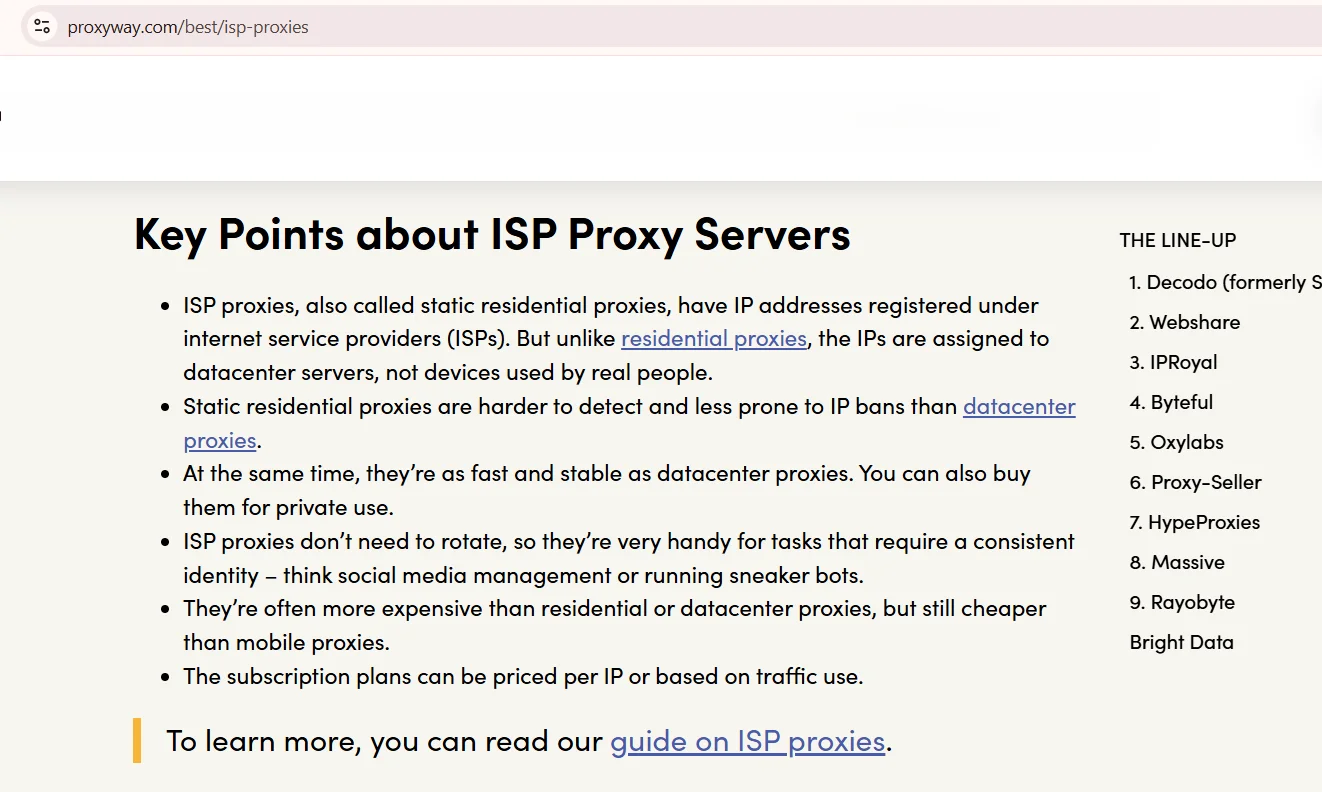
The address doesn't rotate on its own, so a session can stay open for hours or days. WHOIS records point to a phone or cable company, not a hosting firm, so the IP reads as legitimate. Datacenter proxies skip that step and get flagged faster on strict targets. This setup trades flexibility for a longer session life than a rotating pool offers.
ISP vs rotating residential vs datacenter
ISP proxies vs residential rotating pools comes down to one trade: a fixed address versus constant refresh. An ISP proxy borrows the speed of a datacenter box and the carrier-issued address of a home connection. Datacenter wins on price when a target never checks ownership. The table below lines up all three on the same criteria.
Criterion |
ISP (static residential) |
Rotating residential |
Datacenter |
|---|---|---|---|
| IP source | Consumer ISP block, datacenter hosted | Real home devices | Datacenter hosting |
| Session length | Long, non-rotating | Short, rotates automatically | Long, non-rotating |
| Billing unit | Per IP or per GB | Per GB | Per IP or per GB |
| Detection risk | Lower than datacenter | Lowest | Highest |
Source: 10 Best ISP Proxy Providers of 2026, proxyway.com, screenshot taken August 2026
Static residential providers compared
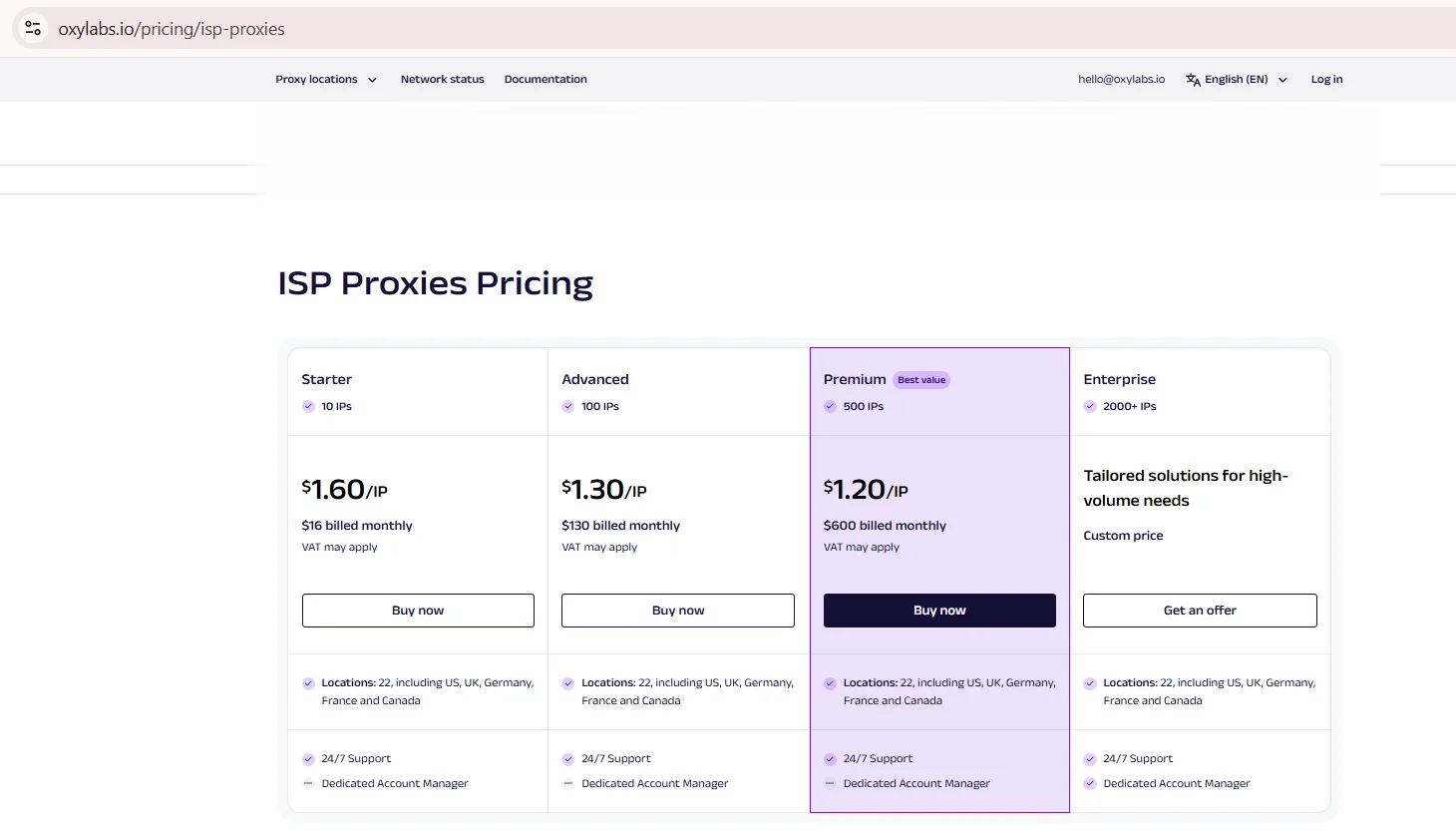
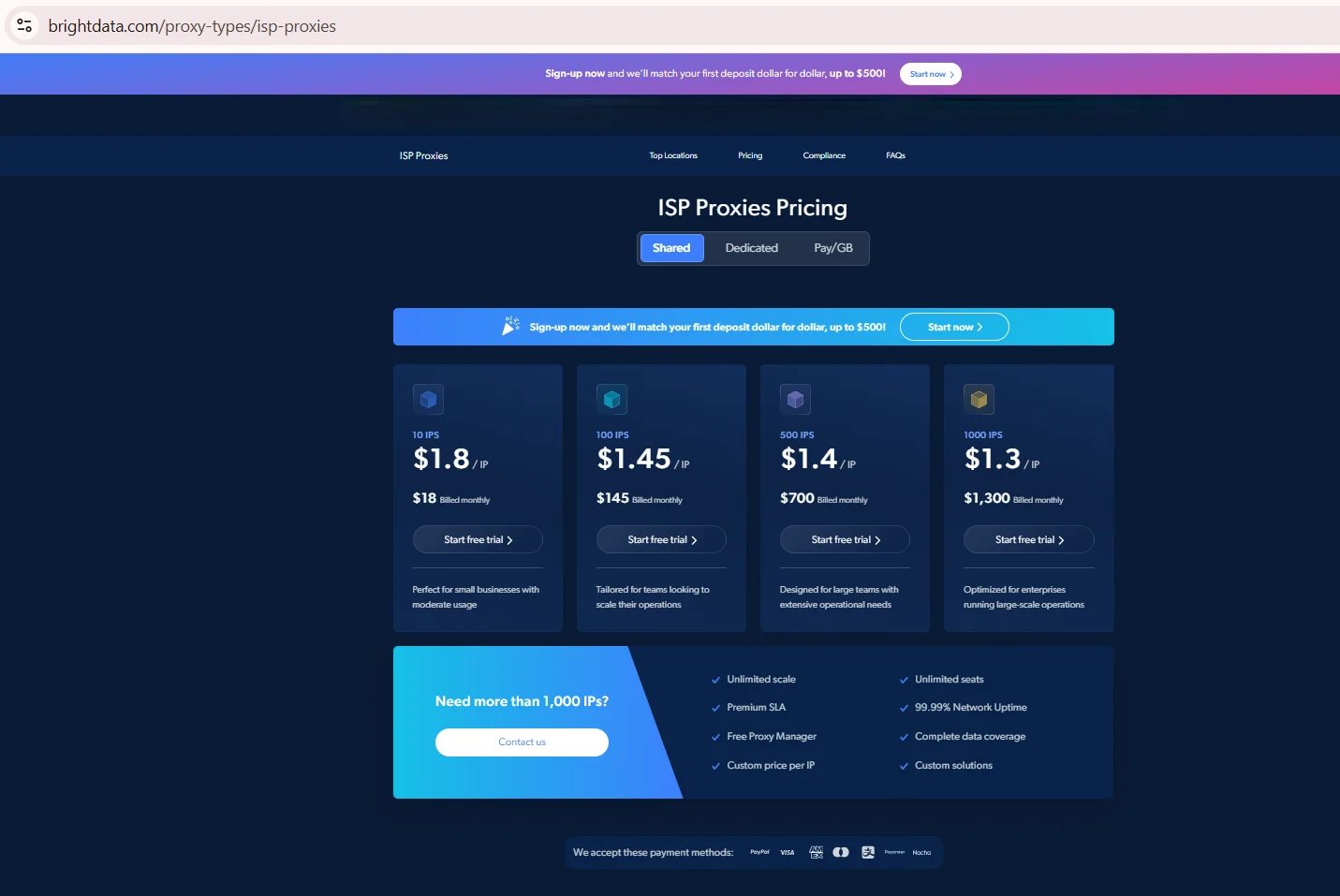
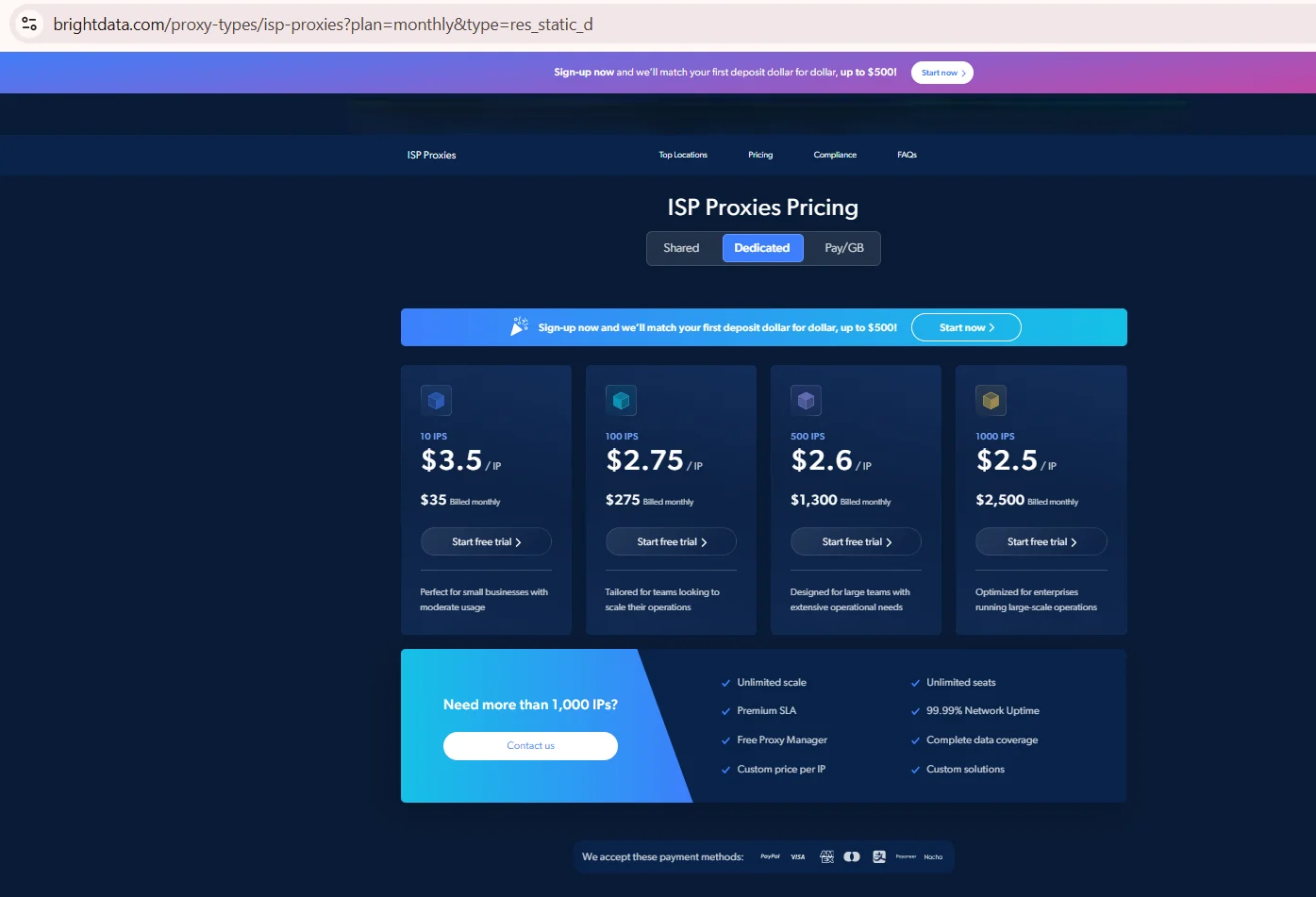
Five ISP proxy providers, Bright Data, Oxylabs, Decodo, Webshare and IPRoyal, publish enough data to sit next to Insocks in one table. Countries and protocols come from each vendor's page. Missing figures read "Not published" instead of a guess. Data as of August 2026. Every row comes from the provider’s own product or pricing page, shown alongside the table.
Provider |
Countries |
Documented ASNs |
Dedicated / shared |
Protocols & UDP |
|---|---|---|---|---|
| Bright Data | ~50, vendor claim | Not published | Shared, dedicated | HTTP, HTTPS, SOCKS5; QUIC over UDP not stated on the product page |
| Oxylabs | 22 | British Telecom, Comcast, Lumen, Frontier, per the vendor page | Shared (up to 3 users) | HTTP, HTTPS, SOCKS5 |
| Decodo | 16 | Not published | Shared, dedicated | HTTP, HTTPS, SOCKS5; QUIC over UDP not stated on the product page |
| Webshare | ~15 | Not published | Shared, private, dedicated | HTTP, SOCKS5 |
| IPRoyal | ~32 | Not published | Dedicated only | HTTP, HTTPS, SOCKS5, UDP (DC & ISP) |
| Insocks | Multiple US locations | Not published | Dedicated | HTTP, HTTPS, SOCKS5, UDP |
Source: Oxylabs Proxies Pricing, oxylabs.io, screenshot taken August 2026
Source: ISP Proxies, brightdata.com, screenshot taken August 2026
Source: ISP Proxies, brightdata.com, screenshot taken August 2026
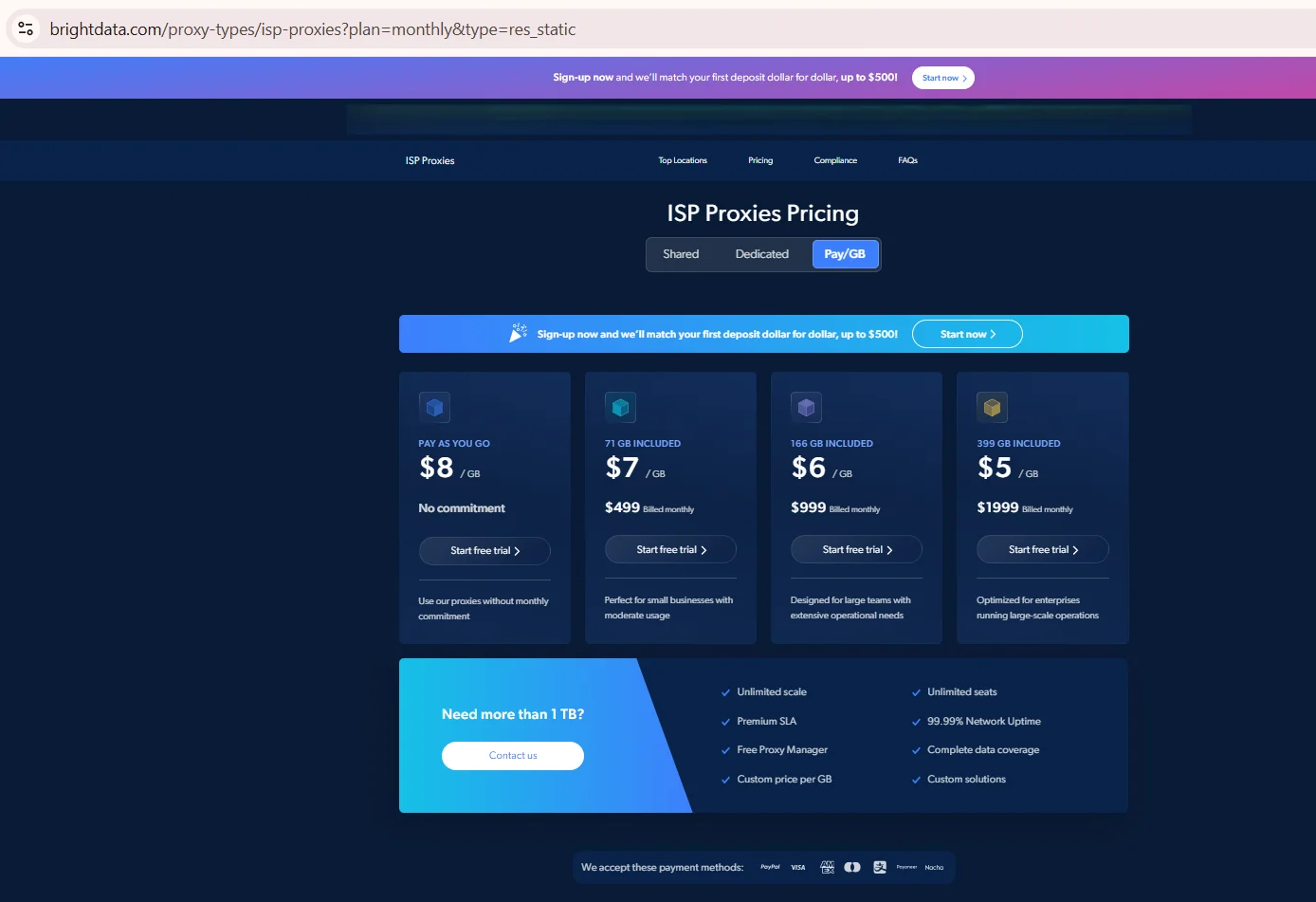
Source: ISP Proxies, brightdata.com, screenshot taken August 2026
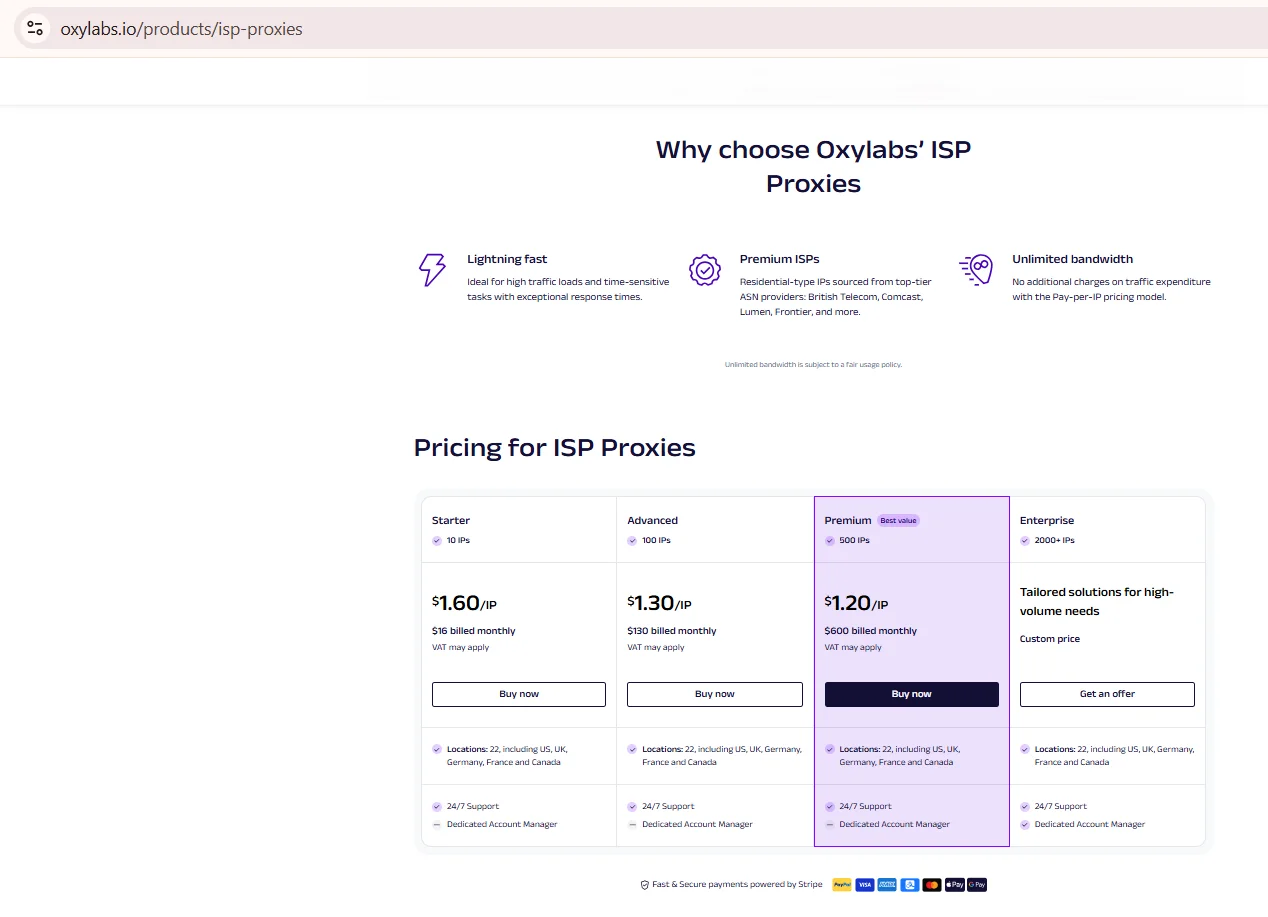
Source: ISP Proxies, oxylabs.io, screenshot taken August 2026
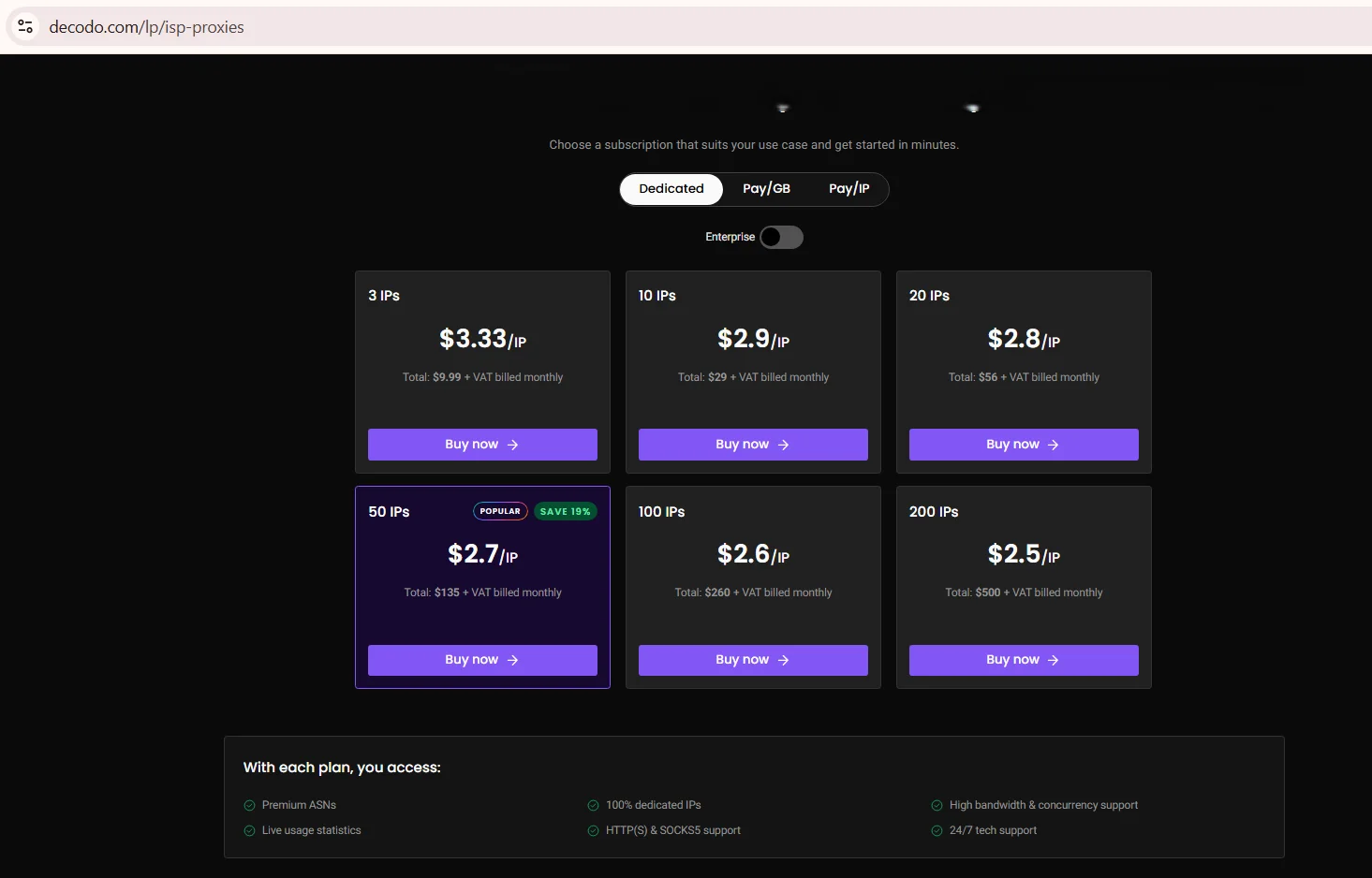
Source: ISP Proxies Pricing, decodo.com, screenshot taken August 2026
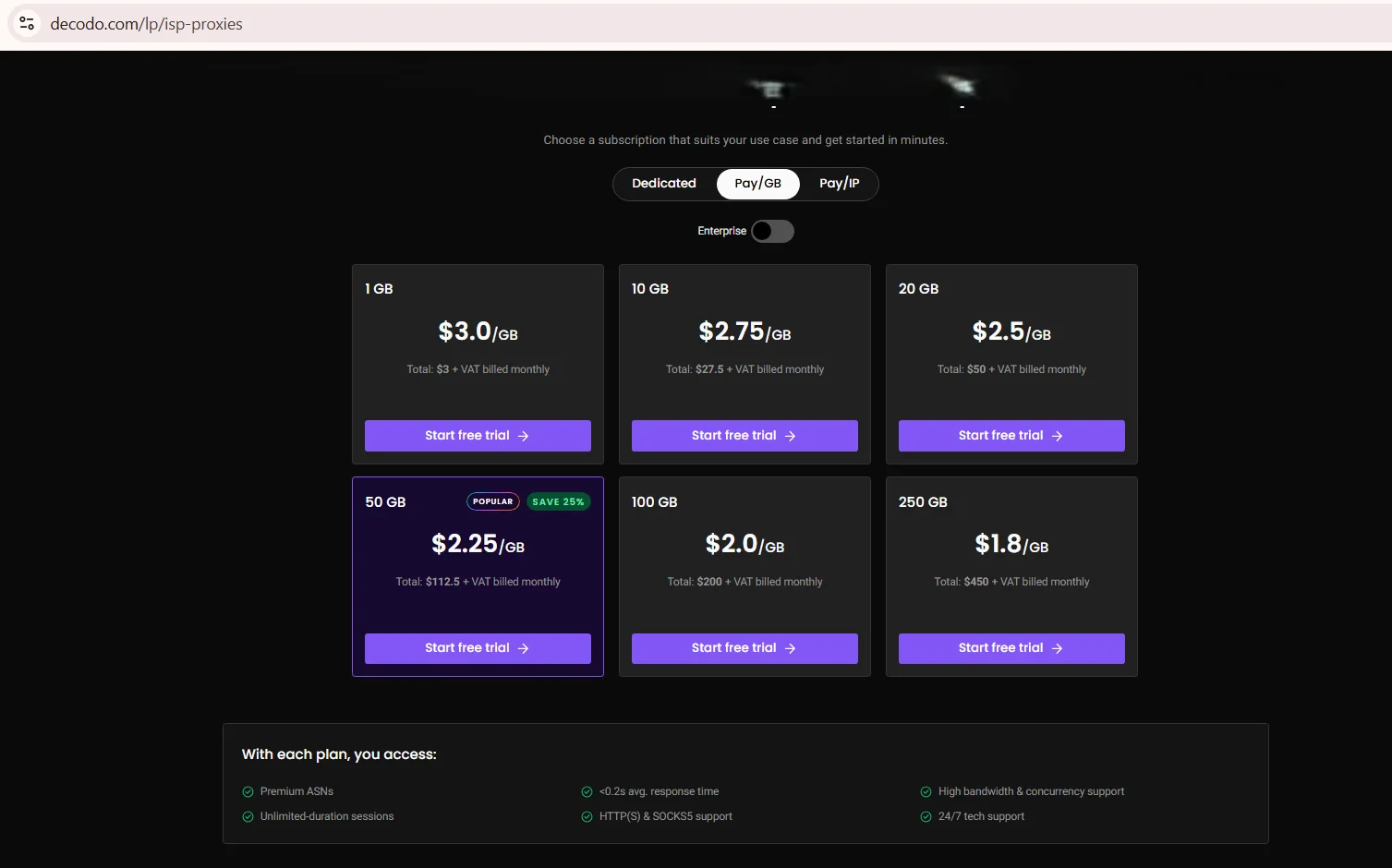
Source: ISP Proxies Pricing, decodo.com, screenshot taken August 2026
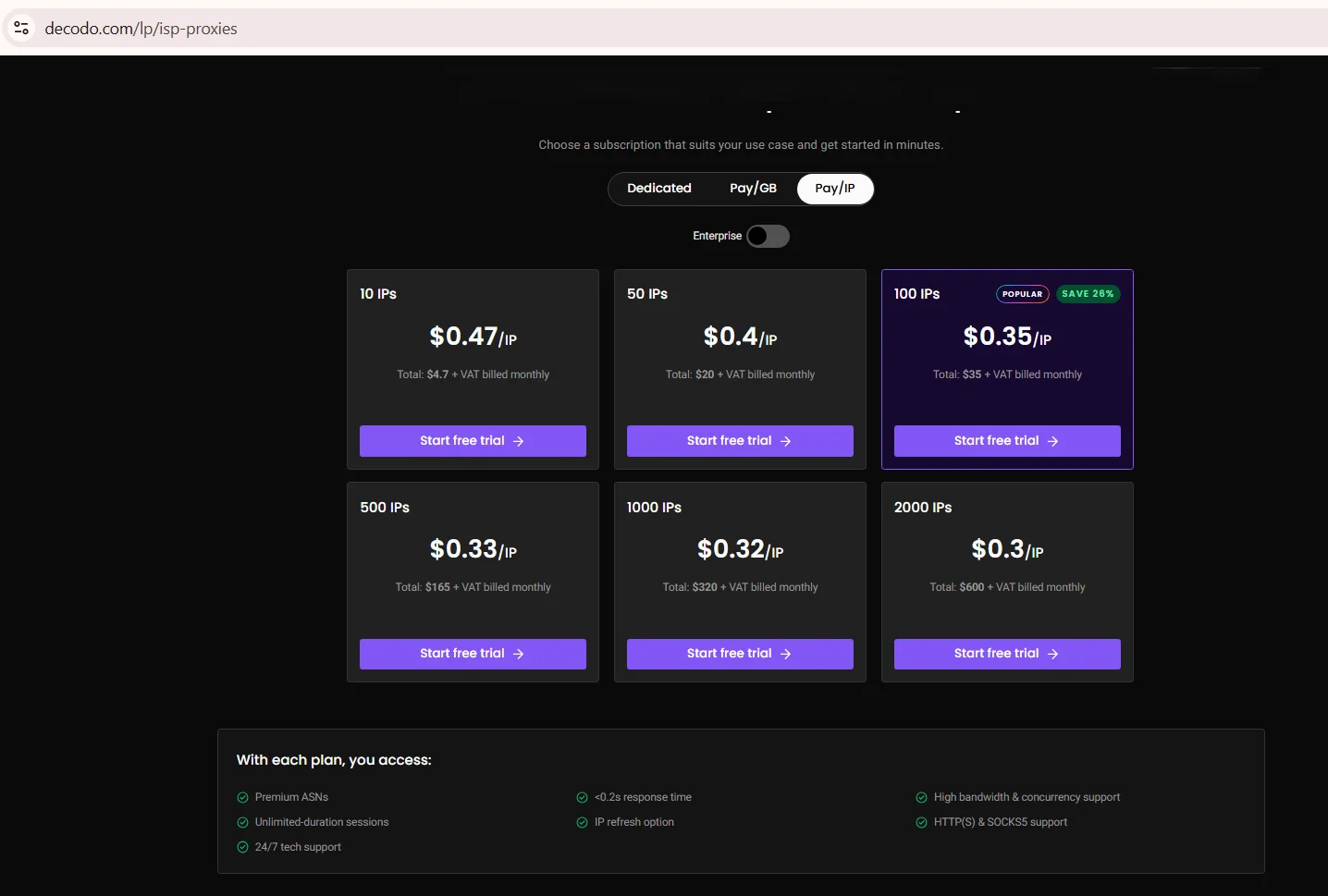
Source: ISP Proxies Pricing, decodo.com, screenshot taken August 2026
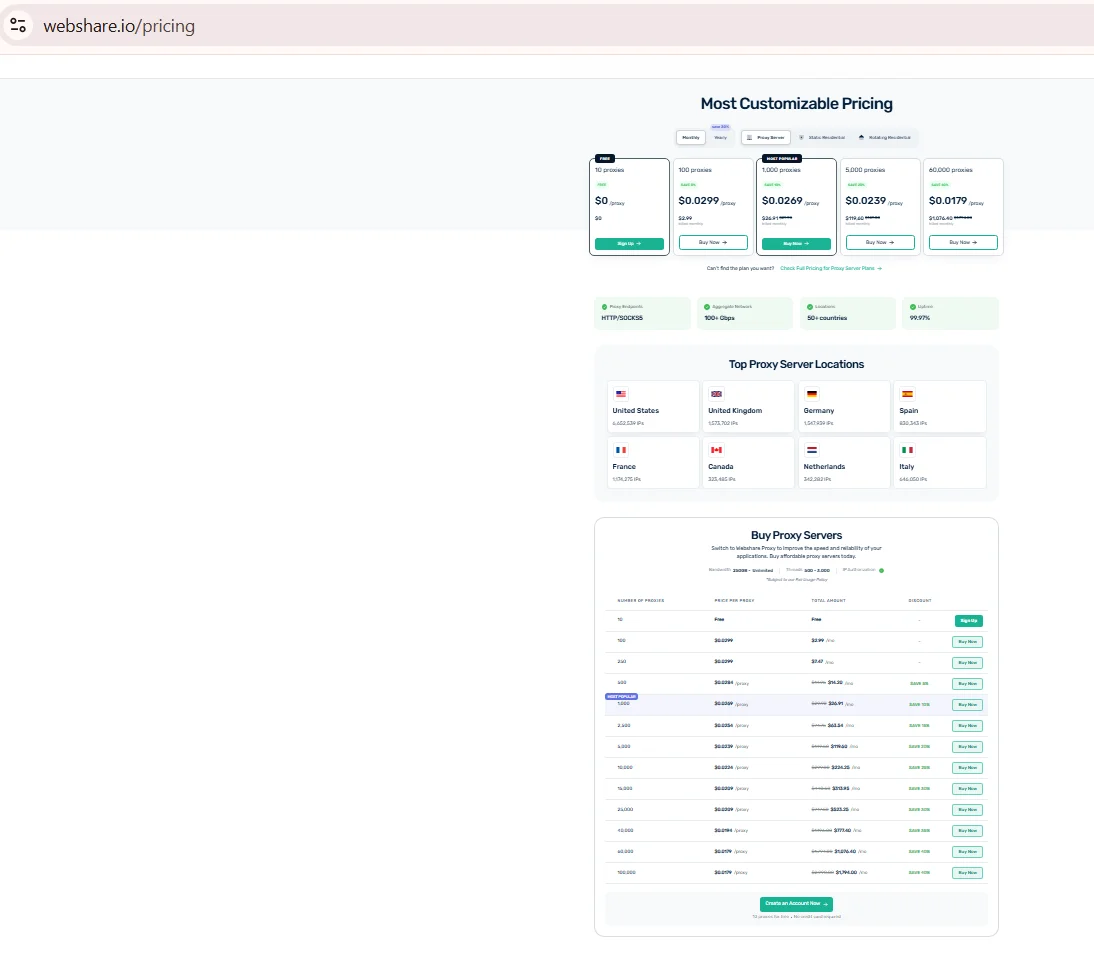
Source: ISP Proxies, webshare.io, screenshot taken August 2026
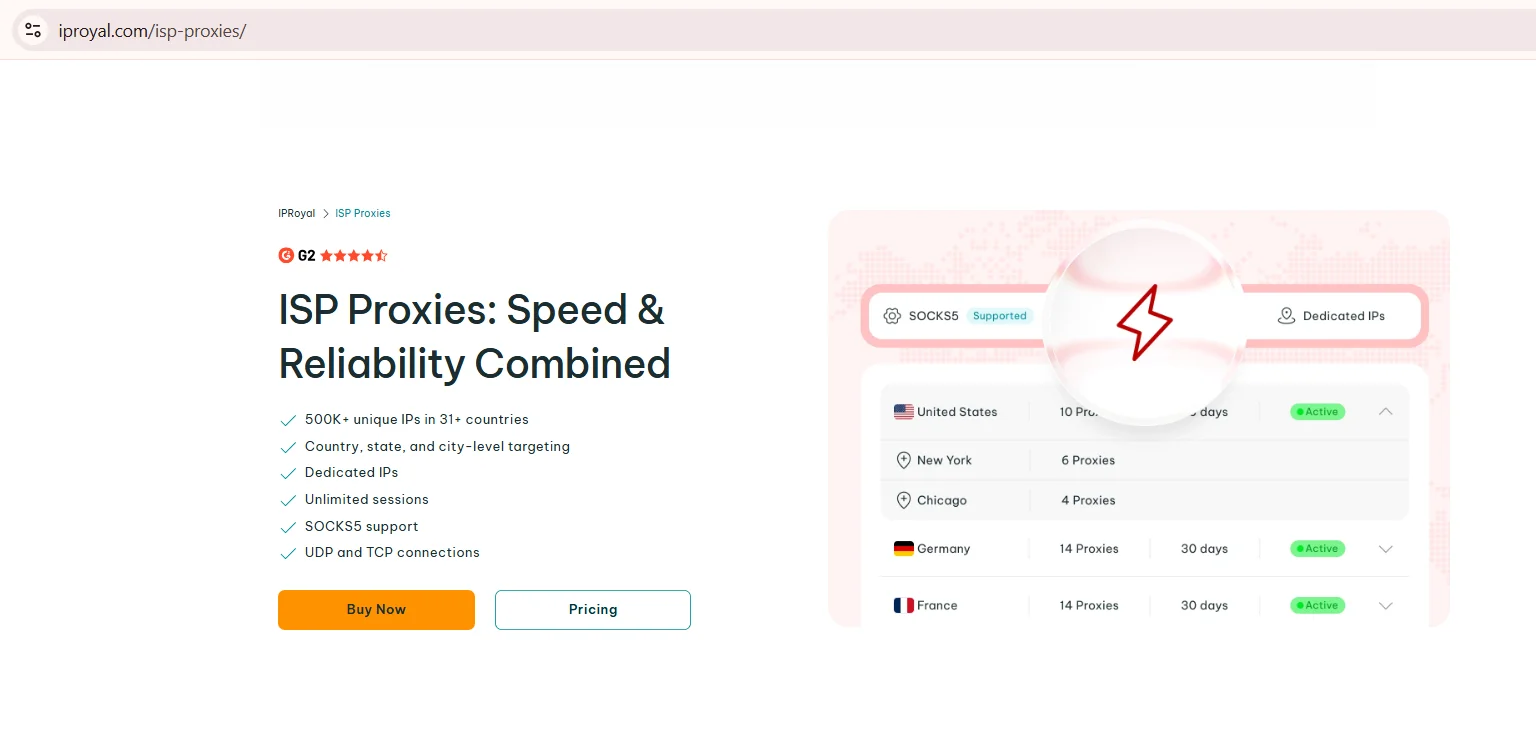
Source: ISP Proxies, iproyal.com, screenshot taken August 2026
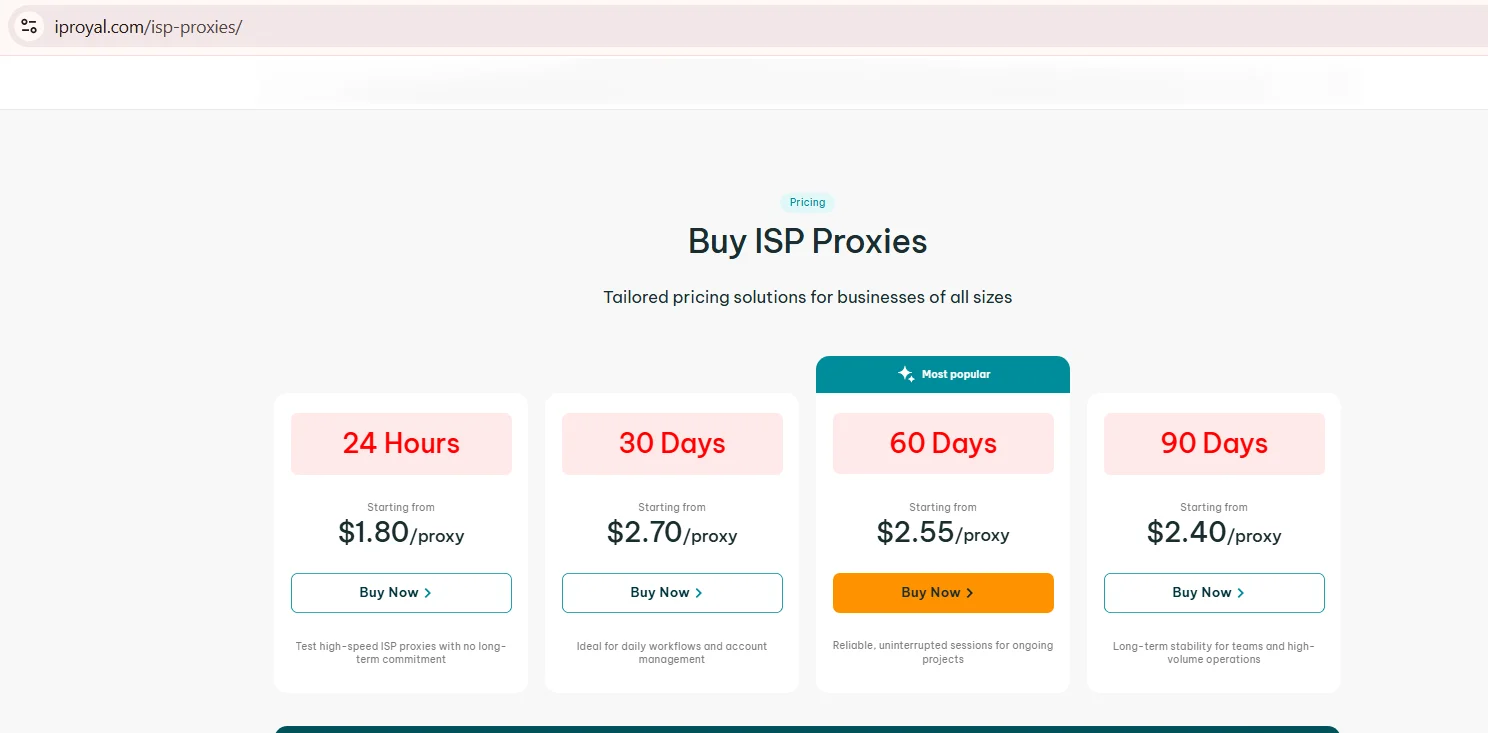
Source: ISP Proxies, iproyal.com, screenshot taken August 2026
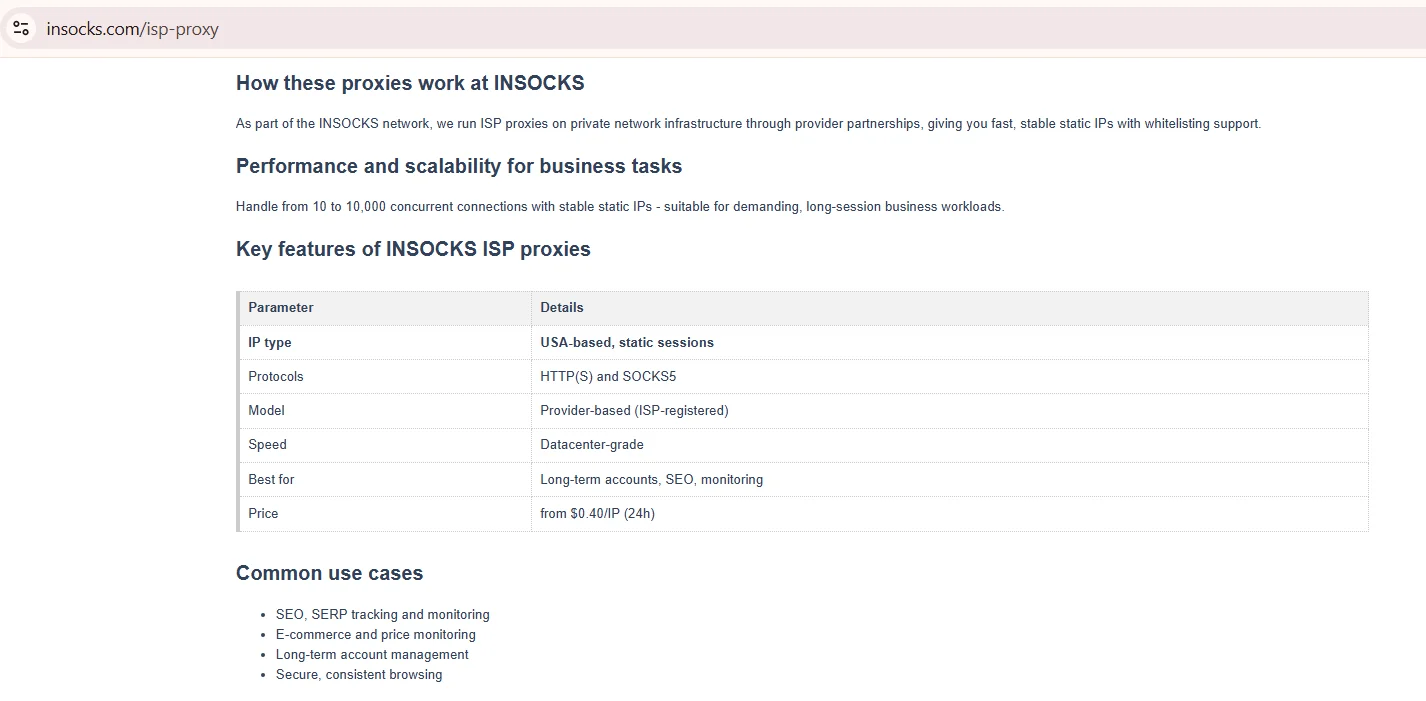
Source: Key features of INSOCKS static proxies, insocks.com, screenshot taken August 2026
Bright Data and IPRoyal cover the widest geography among these static residential proxies. Oxylabs stands out for naming carrier ASNs instead of a bare country count, useful once you run your own check.
When a static IP is the right choice
Some sessions need the exact same address every time, not a fresh one per request.
- ✅ Good fits: multi-day logins, API whitelisting, repeatable checks on a site you're authorized to test.
- ❌ Poor fits: large-scale scraping needing diversity, or work where one flagged IP sinks the batch. A static ip proxy fits squarely in that first column.
Legitimate use matters here. In the US, using a proxy is lawful if it doesn't violate a site's terms or break other law. Insocks expects customers to stay inside that line. A team running its own SEO checks fits this kind of fixed address.
ASN quality and how to verify it yourself
Don't take a vendor's ASN claim at face value on static residential proxies. Run the IP through an independent whois lookup and compare the organization field to the sales page. A consumer entry reads differently from a hosting company name. Six steps cover a proper check.
- Grab the IP.
- Run it through a free lookup tool for ASN and organization.
- Check whether the organization matches a residential carrier, not a cloud host.
- Cross-reference the country you purchased.
- Repeat this now and again; a consumer asn can shift over time.
ISP proxy providers rarely hide this on purpose, but marketing copy sometimes rounds up. A five-minute lookup settles it, at no cost.
Bandwidth limits, fair use and IP replacement
Every plan carries some ceiling: a traffic cap, a fair-use clause, or a concurrency rule past a threshold. Oxylabs documents this precisely, up to 100 sessions per IP until 50 GB monthly, then the limit drops to 10 for the rest of the cycle, a figure published on its own limits page rather than in the pricing table. Other vendors set their own limits for each static residential proxy they sell.
Parameter |
What to verify |
Where documented |
|---|---|---|
| Bandwidth fair use | GB threshold for throttling | FAQ or terms page |
| IP replacement policy | How often a static IP swaps | Billing docs |
| Session duration | Unlimited or capped | Spec sheet |
Refresh rules vary widely across ISP proxy providers. IPRoyal limits refreshes to once a month; Webshare lets a customer pick an interval, none to five minutes. Neither figure applies to the other, so check the source.
Pricing: per IP vs per GB and how to compare them
Two billing models dominate this market, one per IP, one per GB, and they aren't comparable without a quick calculation. Oxylabs' Starter tier lists 10 IPs at $1.60/IP, or $16 monthly, dropping to $1.20/IP at 500 IPs. Decodo starts at $4.70 for 10 IPs and Bright Data at $18, both read off their own pricing pages on the same day, a spread typical of the best ISP proxies on the market. $4.70 for 10 IPs; Bright Data starts at $18, a spread typical of the best ISP proxies on the market. Neither number means much until converted to one unit.
How to compare across billing models
Pick one workload, say 10 static IPs for a month, then price that scenario across every candidate.
- Convert per-GB plans to a monthly estimate from your average traffic per IP.
- Convert per-IP plans to per-GB only for traffic-heavy work.
- Separate promo pricing from list price; a code changes the rate, not the base.
- Note the billing unit next to every price, "$16" means nothing alone.
Among the best ISP proxies, per ip pricing looks cheaper for light, session-based work. Per-GB billing favors volume scraping where address count matters less than throughput.
How to test ISP proxies before scaling
A proper test catches problems before production, not after. Skip straight to a live target and you'll miss latency spikes that only appear under load. The sequence below suits a small batch of static residential proxies.
- Run a whois lookup on a sample IP and confirm a consumer ISP.
- Verify geolocation via an independent lookup service, not the provider's dashboard.
- Open a long session and hold it for hours to check for drops.
- Measure latency as p50 and p95 across 200-plus requests.
- Check blacklist status on sample IPs before a bigger buy.
- Run that batch against your real production target.
Even the most established static residential proxies fail this test when nobody runs it. Long session stability only shows up once a connection stays open past the first few minutes.
Common mistakes when buying ISP proxies
Most buying mistakes come from skipping a check, not a bad provider. The same errors show up across teams new to this type, even ones offering the best ISP proxies on paper. Catching them early saves a ticket.
- Trusting an ASN claim without an independent whois lookup.
- Comparing a per-GB quote to a per-IP quote without converting first.
- Skipping the blacklist check on IPs that "look fine."
- Buying the cheapest plan for work that needs stability, not volume.
- Ignoring the ip replacement policy until a flag hits.
None of these mistakes are rare among shoppers comparing static residential proxies; they just surface later than they should. A short checklist before checkout avoids most of them.
How Insocks fits static IP workflows
Disclosure: Insocks is our service. Insocks pairs a fixed US IP with SOCKS5 and UDP support, which some competitors list as HTTP-only. Locations span multiple US regions, useful for teams targeting specific audiences. The table breaks down each feature of this dedicated ISP proxy.
Feature |
What it means in practice |
|---|---|
| SOCKS5 with UDP | Works for real-time traffic, not just HTTP |
| Multiple US locations | Matches an IP region to a target audience |
| Instant activation | No delay between purchase and first use |
| API access | Static IPs requested programmatically |
Anyone who wants to buy ISP proxies for account management, over a plain datacenter swap, can start small. 👉 Try a free demo first.
Key takeaways
Five points cover most of what matters before buying a static IP.
- A fixed, ISP-issued IP with datacenter hosting and a non-rotating address defines this proxy type.
- Compare providers only on documented facts: price, countries, ASN detail, protocols.
- Bandwidth fair use and ip replacement policy live in the terms page, not the banner.
- Test with a whois lookup, a long session, and 200-plus requests before scaling.
- Per-IP and per-GB pricing need one shared workload to compare honestly.
Disclosure and data sources
All data in this article, including prices, tariff tiers, limits and product availability, is accurate as of the publication date shown on this page. Vendor terms change frequently and without notice, entry tiers move with volume, and promotional pricing may apply on the day you read this. Nothing here is an offer, a guarantee of current terms, or a recommendation to buy.
This article is published by Insocks, one of the static residential proxies services listed here, and we have a commercial interest in it. We are not affiliated with any other provider named; none of them sponsored, reviewed or approved this article. Third-party data was taken from providers' own pages on August 2026 and may be promotional. Trademarks belong to their owners, used for identification only.
Frequently asked questions
What are static residential proxies?
IPs issued by a consumer ISP, hosted on a server, and kept fixed for one client instead of rotating.
How do ISP proxies differ from rotating residential proxies?
ISP proxies keep one IP long-term; rotating residential proxies swap real home IPs each session.
How do I check the ASN of a proxy IP myself?
Run the IP through an independent whois or IP lookup tool and read the organization field.
What happens if my static IP gets flagged?
Request a replacement under the provider's IP policy; usage patterns often trigger flags.
Is per IP or per GB billing cheaper for my workload?
It depends on traffic volume; convert both to one workload before comparing totals.
Do static residential providers document UDP support?
Some do, like Insocks, Oxylabs and Decodo; others list HTTP or SOCKS5 only, so check the spec page.