
SOCKS5 UDP explained: how UDP ASSOCIATE works
SOCKS5 UDP support means the proxy can relay UDP datagrams, not just TCP, through a command called UDP ASSOCIATE. That's why SOCKS5 shows up in DNS lookups, VoIP calls, and QUIC work. The mechanics get covered below, citing the spec. A separate page compares providers with UDP support; this stays protocol-level.
Legend used in every table below: ✅ documented by the vendor · ❌ not offered or not documented · ⚠️ documented with limits · 💡 practical tip. No other marks are used on this page.
How SOCKS5 differs from SOCKS4 and HTTP proxies
SOCKS5 differs from SOCKS4 and HTTP proxies mainly in protocol support and auth. SOCKS4 forwards TCP only and skips authentication; HTTP proxies stay locked to web traffic and inspect headers. SOCKS5 sits one layer lower, the session layer, staying protocol agnostic. That's why the SOCKS5 vs SOCKS4 comparison keeps coming up.
| Criterion | HTTP | SOCKS4 | SOCKS5 |
|---|---|---|---|
| Traffic type | HTTP/HTTPS only | TCP only | TCP and UDP |
| Authentication | Basic, header-based | None | Username/password, IP whitelist |
| DNS handling | Local | Local | Local or remote (SOCKS5h) |
| OSI layer | Application (7) | Session (5) | Session (5) |
SOCKS4 still fits old scripts that never touch UDP at all, and for those it works fine without changes. SOCKS5 is the sane pick for anything real-time or UDP-dependent instead.
The SOCKS5 handshake and UDP ASSOCIATE step by step
The SOCKS5 UDP associate command opens a temporary relay so a client can send and receive UDP datagrams via the proxy, not directly. It runs alongside the standard handshake: greeting, auth, request. Once granted, the reply hands back a relay address for every packet after. Per Rama's notes on RFC 1928, the TCP session behind it must stay open, or the relay dies.
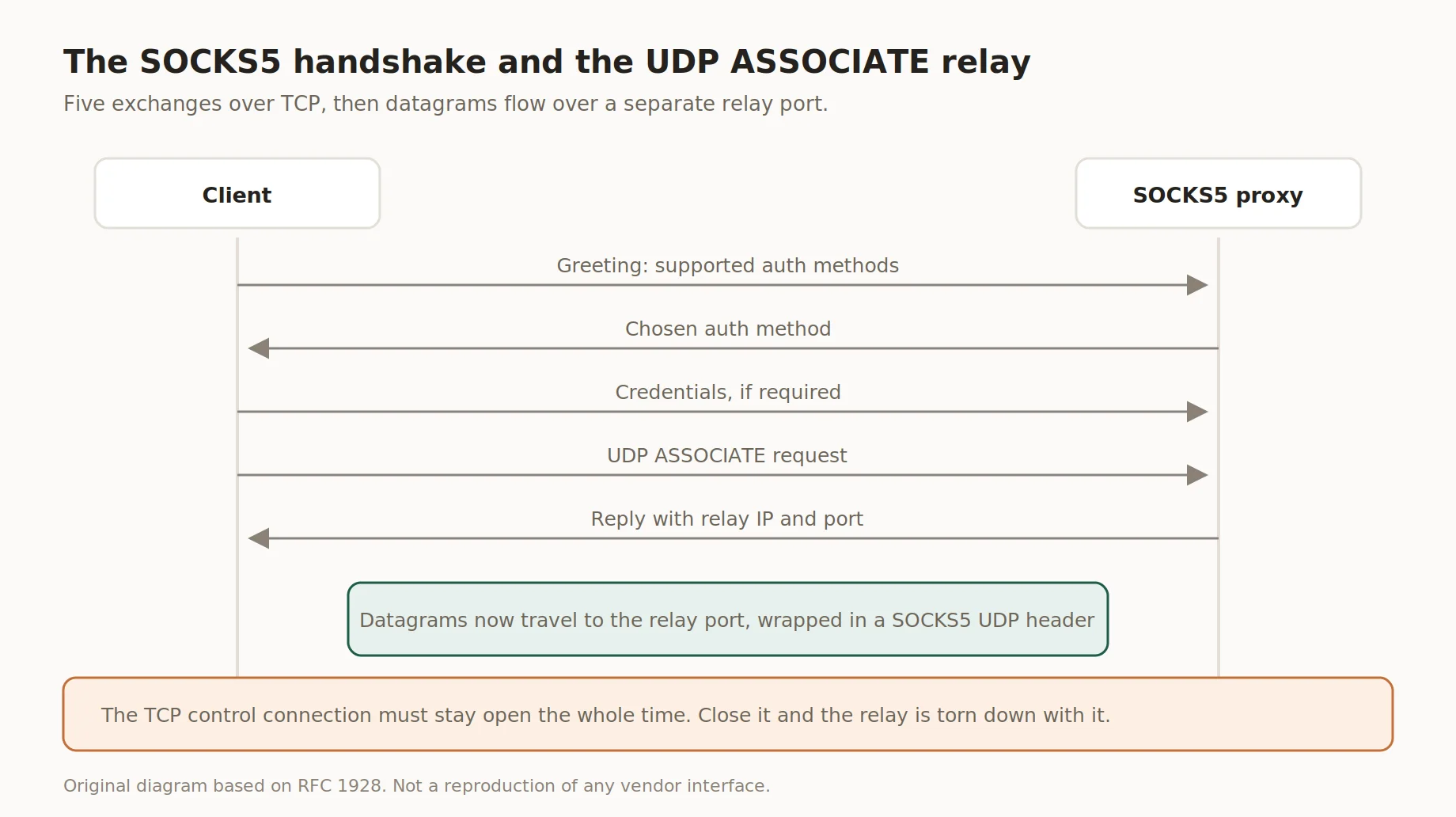
The SOCKS5 handshake and the UDP ASSOCIATE relay
- Step 1. TCP handshake. Client connects, sends a greeting with auth methods.
- Step 2. Method selection. Proxy picks a method, often password or no-auth.
- Step 3. Authentication. If required, both sides exchange credentials.
- Step 4. UDP ASSOCIATE request. Client sends the command with an IP/port hint, or 0.0.0.0:0.
- Step 5. Relay port assignment. Proxy replies with a bound address for datagrams.
- Step 6. Datagram forwarding. Client wraps packets in a SOCKS5 header; proxy unwraps and forwards.
That port stays tied to the TCP connection, easy to forget when a session drops.
TCP vs UDP through a proxy
TCP and UDP behave differently through a proxy, and the SOCKS5 protocol handles both, just not identically. TCP needs a handshake, ordered delivery, and retransmission, adding latency but guaranteeing delivery. UDP skips all that: no handshake, no order, no resend, leaner for time-sensitive traffic.
| Criterion | TCP | UDP |
|---|---|---|
| Connection setup | Handshake required | Connectionless |
| Delivery order | Guaranteed | Not guaranteed |
| Retransmission | Automatic | None |
| Typical use | Web pages, file transfer | DNS, VoIP, QUIC, gaming |
| Latency | Higher | Lower |
Picking the wrong transport isn't a proxy issue, it's a mismatch between app needs and what it runs on.
When UDP support actually matters
Not every workload can tolerate the overhead a TCP-only path adds. SOCKS5 UDP matters whenever an app can't absorb handshake or retransmission overhead. DNS resolution, QUIC-based HTTP/3, VoIP, and multiplayer gaming lean on UDP by design. Skip UDP support and those apps fail outright, or fall back to a slower path. This isn't fringe, more of the web keeps shifting toward the quic protocol.
Worth checking UDP support for first:
- ✅ DNS lookups needing the same egress IP as the rest of a session
- ✅ QUIC and HTTP/3 traffic, for testing site behavior over the new transport
- ✅ VoIP and video call quality checks across regions
- ✅ Real-time monitoring, where timing matters
- ✅ Custom UDP protocols built for internal tools
This only makes sense as legitimate use of SOCKS5 UDP: your own infrastructure, your accounts, or contracted work, never someone else's systems.
DNS resolution: SOCKS5 vs socks5h
Plain SOCKS5 resolves DNS locally by default, so a query can leak outside the tunnel. SOCKS5h flips that: it sends the domain name to the proxy, which handles remote dns resolution instead. The gap sounds small until local resolution exposes what sites a session queries. Privacy-conscious setups default to SOCKS5h whenever the client supports it.
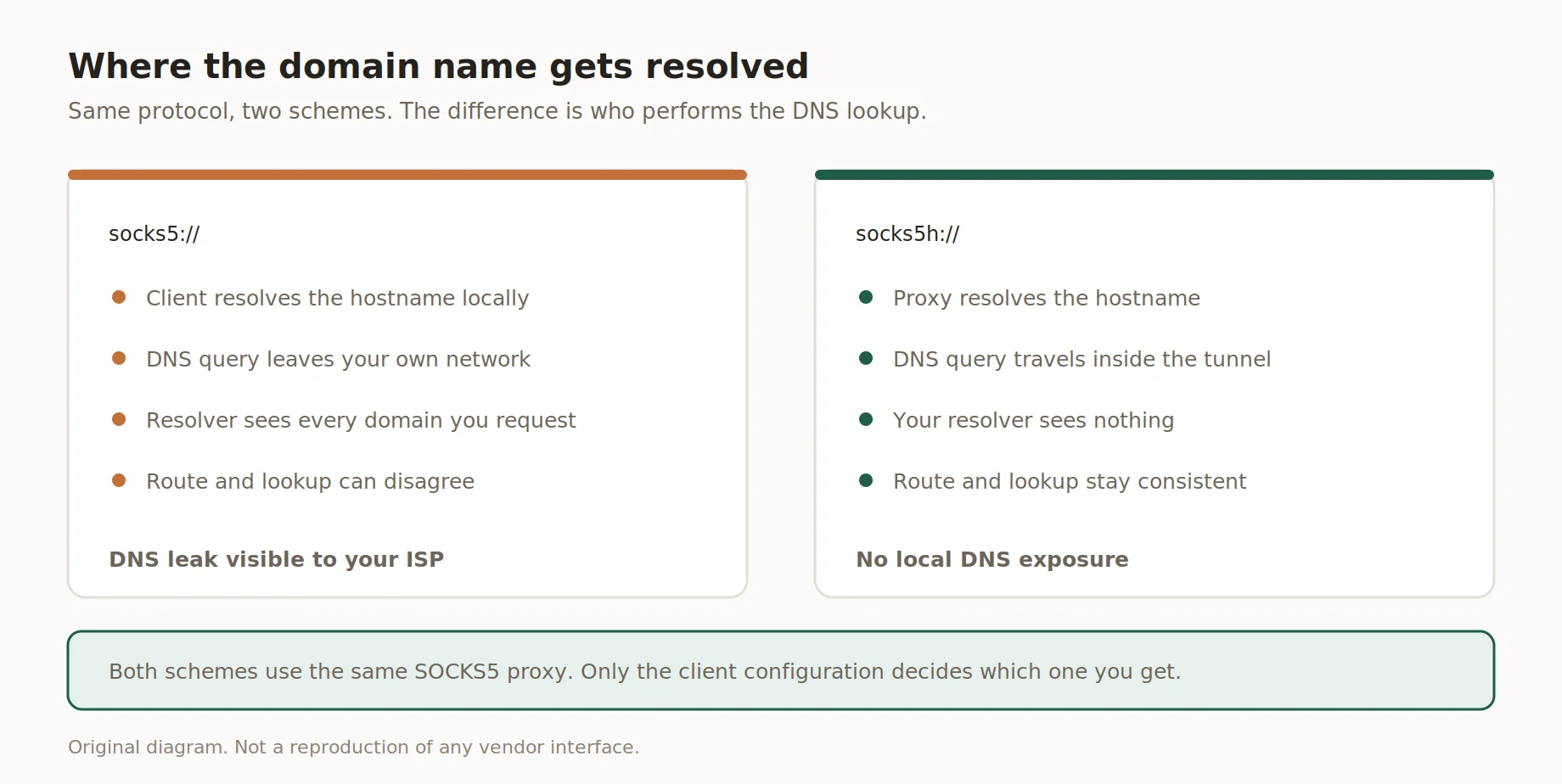
Where the domain name gets resolved
In cURL it's one flag: --socks5 resolves locally, --socks5-hostname remotely.
Authentication methods in SOCKS5
The SOCKS5 protocol defines standard authentication methods, and the right pick depends on the setup. Username and password works cleanly with browsers, scripts, and antidetect tools. IP whitelisting skips credentials and checks the connecting IP against an approved list, suiting fixed servers. Both stop unauthorized use; neither encrypts.
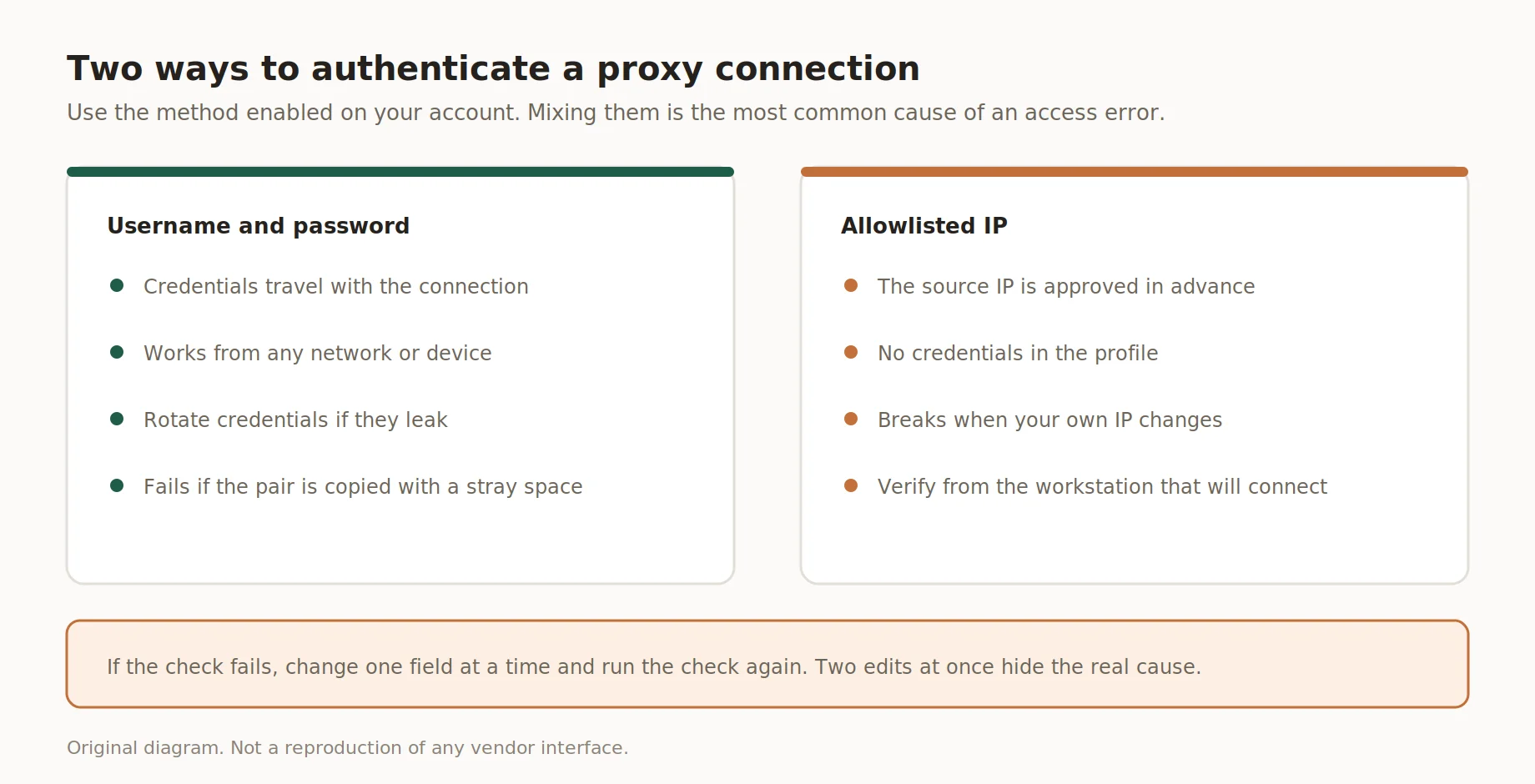
Two ways to authenticate a SOCKS5 connection
How the two methods split by use case:
- ✅ Username/password: fits scripts and antidetect setups with a changing IP
- ✅ IP whitelisting: fits fixed servers and automation with static IPs
💡 Rotate shared credentials periodically for team access
What SOCKS5 does not do
Does SOCKS5 support UDP? Yes, through UDP ASSOCIATE, but that's routing, not protection. Does that include encryption? No, the protocol was never built to encrypt payloads, so plaintext stays plaintext unless wrapped in TLS. SOCKS5 also won't touch a browser's fingerprint; canvas, fonts, and screen data pass through as-is. It's a routing layer, not privacy.
- ❌ No payload encryption; SOCKS5 routes traffic, doesn't wrap it in TLS
- ❌ No browser fingerprint masking; canvas and font data pass through unchanged
- ❌ No protection against WebRTC leaks; that's a browser setting, not proxy
- ❌ No built-in malware or content filtering
How to test UDP support in your setup
A quick verification pass beats guessing whether a package really works. Testing SOCKS5 UDP associate behavior takes five or six checks, and none of them need special tools beyond a proxy client and a terminal window. Start small: confirm the basics before chasing performance. Packet loss and latency only matter once the connection is stable. Run these in order, not straight to timing.
- Step 1. Connect the client, confirm the handshake completes.
- Step 2. Send a UDP ASSOCIATE request, check for a valid relay address.
- Step 3. Run a DNS query through the relay, confirm it returns correctly.
- Step 4. Check the outbound IP against a what-is-my-ip tool.
- Step 5. Measure packet loss across a few hundred UDP packets.
- Step 6. Record latency as p50 and p95, since spikes matter more than average.
Common mistakes
Testing habits vary a lot between teams, but the failure patterns repeat. Most UDP headaches trace back to a few mistakes. Assuming every package supports UDP without checking docs is the biggest one, since does SOCKS5 support UDP often depends on the package tier, not the protocol name. Testing latency before the relay works comes a close second.
- ❌ Assuming UDP works on every package without checking docs
- Skipping the DNS test, jumping straight to application traffic
- ❌ Ignoring packet loss and looking only at average latency
- ❌ Reusing the same relay port across unrelated sessions
- ❌ Forgetting the TCP control connection must stay open
None of these mistakes are exotic, they just come from skipping a check most people assume the SOCKS5 protocol handles on its own without any manual verification step.
How Insocks supports SOCKS5 with UDP
Disclosure: Insocks is our service, so treat this section as vendor information, not independent research, since there's an obvious business interest in how this reads. Every package handles the protocol basics the same way under the hood, but the UDP piece varies quite a bit between providers and tiers. The full stack was built with UDP in mind from day one, not patched in later. Insocks proxies support SOCKS5 UDP on residential, mobile, ISP, and static packages, since UDP relay sits in the core stack rather than being added on top as an afterthought. Setup needs no extra config: pick SOCKS5 in your tool and UDP carries automatically. That's why teams pick Insocks when UDP just has to work.
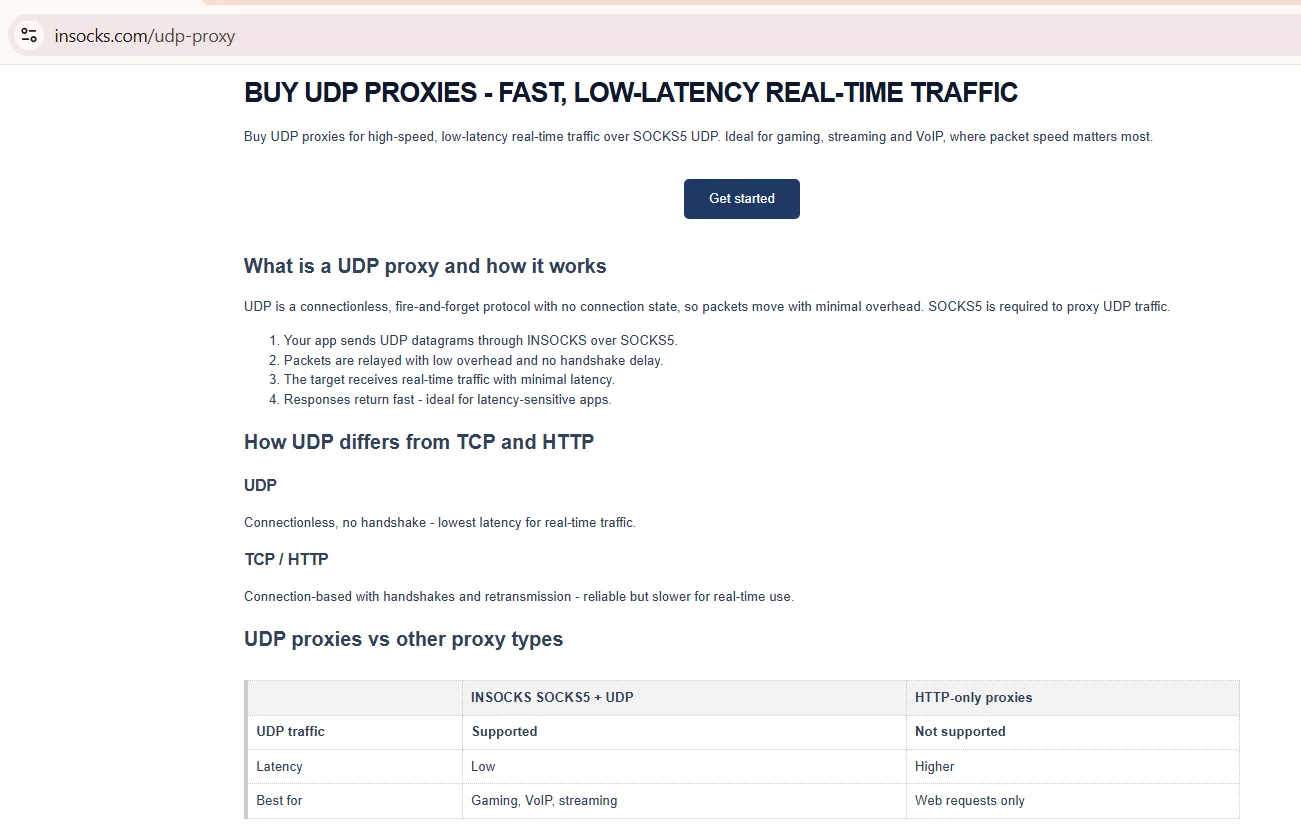
Source: UDP proxy, insocks.com, screenshot taken August 2026
Authentication works with login and password, or without, depending on account setup. Every SOCKS5 UDP associate request goes through the same relay infrastructure regardless of which package sent it.
| Feature | What it means in practice |
|---|---|
| UDP relay across packages | Built into residential, mobile, ISP, static |
| Instant activation | Access starts within minutes of signup |
| API access | Automated proxy management for scaled work |
| Flexible authentication | Login/password or no-auth, per account |
| 24/7 support | Telegram support for setup questions |
Anyone using these proxies confirms lawful use within US regulations and each site's terms of service, since none of this is meant for bypassing rules a target site has put in place on purpose. Check SOCKS5 UDP behavior with the free demo, or go straight to registration.
Key takeaways
The short version for anyone skimming before the FAQ below covers the ground already walked through, section by section, without repeating every last detail from above. It's meant as a quick anchor for anyone who scrolled straight past a step. These points sum up the breakdown above, including whether does SOCKS5 support UDP the way most people assume. Nothing here replaces the specification for edge cases. Treat it as a refresher, not the full picture.
- ✅ SOCKS5 supports TCP and UDP through the UDP ASSOCIATE command
- ✅ SOCKS5h resolves DNS remotely; plain SOCKS5 resolves locally, which can leak
- ✅ Authentication is username/password or IP whitelist, never encryption
- ✅ UDP support depends on the package, not just the protocol's name
- ✅ Testing starts with connection basics before latency and packet loss
Disclosure and data sources
All data in this article, including prices, tariff tiers, limits and product availability, is accurate as of the publication date shown on this page. Vendor terms change frequently and without notice, entry tiers move with volume, and promotional pricing may apply on the day you read this. Nothing here is an offer, a guarantee of current terms, or a recommendation to buy.
This article is published by Insocks. Insocks sells proxies and has a commercial interest in the section above. Protocol details rest on the cited specification and vendor docs, current as of August 2026. Trademarks belong to their owners.
Frequently asked questions
Straight answers to the questions people ask most about this topic.
Does SOCKS5 support UDP?
Yes, via UDP ASSOCIATE, relaying datagrams through a dedicated port after the TCP handshake.
What is the UDP ASSOCIATE command?
The SOCKS5 command opening a relay port so UDP datagrams pass through the proxy directly.
What is the difference between SOCKS5 and socks5h?
SOCKS5 resolves DNS locally; socks5h resolves it through the proxy, avoiding DNS leaks.
Does SOCKS5 encrypt traffic?
No. SOCKS5 only routes traffic, it doesn't encrypt payloads; use TLS separately.
Can I use SOCKS5 for DNS queries?
Yes, DNS queries route through SOCKS5, and socks5h is the safer choice.
Why does my client fail to open a UDP session?
Usually the package lacks UDP support, the control connection dropped, or auth wasn't set right.