
TLS fingerprinting and JA3: how it affects scraping
TLS fingerprinting identifies an HTTP client from the structure of its TLS handshake, before any application data moves. JA3 and JA4 turn the fields of the ClientHello message into a short hash, and anti-bot systems compare that hash against known browser and bot signatures. A mismatch between the claimed browser and the hash can get a request rejected before headers are even read.
Legend used in every table below: ✅ documented by the vendor · ❌ not offered or not documented · ⚠️ documented with limits · 💡 practical tip. No other marks are used on this page.
What a TLS fingerprint is
A TLS fingerprint is a short signature built from the fields an HTTP client sends in its client hello message during the tls handshake, before encryption even starts. Understanding what is JA3 starts here: JA3 reads five of those fields and turns them into a single hash. Every client, whether it's Chrome, curl, or a Python script, lists cipher suites, extensions, and elliptic curves in its own particular order. Servers read this data in plaintext, since neither side has agreed on encryption keys yet.
The client hello also carries an alpn extension, which tells the server whether the connection prefers HTTP/1.1 or HTTP/2. Different libraries assemble these fields differently depending on the underlying TLS stack, OpenSSL versus BoringSSL versus NSS, for instance. That's the raw material JA3 and JA4 both work from.
💡 Tip: if two requests carry the same fingerprint but different declared browsers, that inconsistency alone can raise suspicion without any header trickery involved.
How JA3 and JA4 are calculated
A JA3 fingerprint is calculated by concatenating five ClientHello fields into one string and hashing it with MD5, producing a 32-character signature (Scrapfly, JA3/JA4 TLS Fingerprinting Guide, 2026). John Althouse, Jeff Atkinson, and Josh Atkins published the original method at Salesforce in 2017, and it still forms the backbone of most TLS based bot checks today. The five fields feeding that hash are TLS version, cipher suites, extensions, elliptic curves, and point formats, joined in a fixed order.
- Extract the TLS version, expressed as a decimal number such as 771 for TLS 1.2.
- List the cipher suites exactly in the order the client sent them, separated by hyphens.
- List the TLS extensions in send order, hyphen separated, skipping GREASE values.
- Append the supported elliptic curves and point formats.
- Join all five fields with commas and hash the resulting string with MD5 to get the ja3 hash.
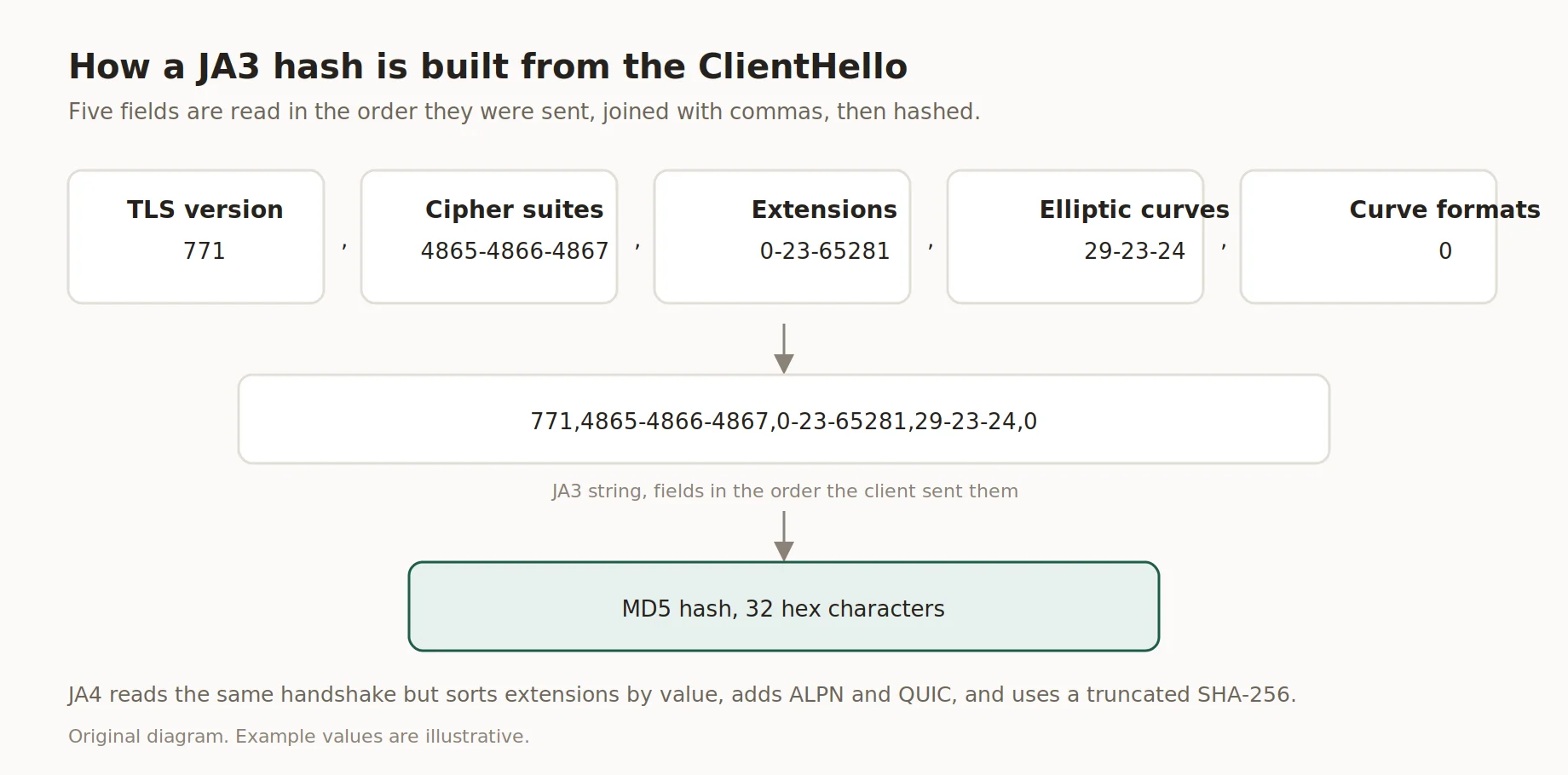
How a JA3 hash is built from the ClientHello
The newer method skips the ordering problem in step 3. Instead of recording extensions as sent, it sorts them by hexadecimal value, which keeps the JA4 fingerprint stable even after browsers began randomizing extension order in 2023 (Scrapfly, 2026). That successor hash also drops MD5 for a truncated SHA-256 and adds ALPN and QUIC support, details JA3 never captured.
| Criterion | JA3 | Successor method |
|---|---|---|
| Hash algorithm | MD5 | Truncated SHA-256 |
| Extension order | As sent | Sorted by hex value |
| QUIC/HTTP3 support | ❌ not offered | ✅ documented |
| ALPN included | ❌ not offered | ✅ documented |
| Created | 2017, Salesforce | 2023, FoxIO |
These structural differences matter for anyone testing their own client. A fingerprint calculated one way won't match a database built for the other method.
Why proxies alone do not solve fingerprinting
Proxies change the IP address a request comes from; they don't touch the tls handshake at all, so TLS fingerprinting still sees whatever library initiated the connection. The handshake happens directly between the client and the destination server, and a standard HTTPS proxy using the CONNECT method just tunnels encrypted bytes without touching them (Shifter, TLS fingerprint glossary, 2026). That means a clean residential IP paired with a default Python client still hands over a fingerprint that reads as script, not browser.
In our test, August 2026, a default requests session routed through three different proxy types returned the identical hash each time, regardless of IP reputation or geography. Only switching the underlying TLS library changed the result. This is the honest part of the conversation: IP quality and fingerprint matching solve two separate problems, and treating one as a fix for the other leads to disappointment fast.
"TLS fingerprinting happens before the first HTTP byte lands. Swapping an IP address does nothing to the handshake underneath it." - Insocks engineering notes, August 2026
- ❌ A residential IP does not rewrite cipher suite order.
- ❌ Rotating proxies does not touch the TLS handshake fields.
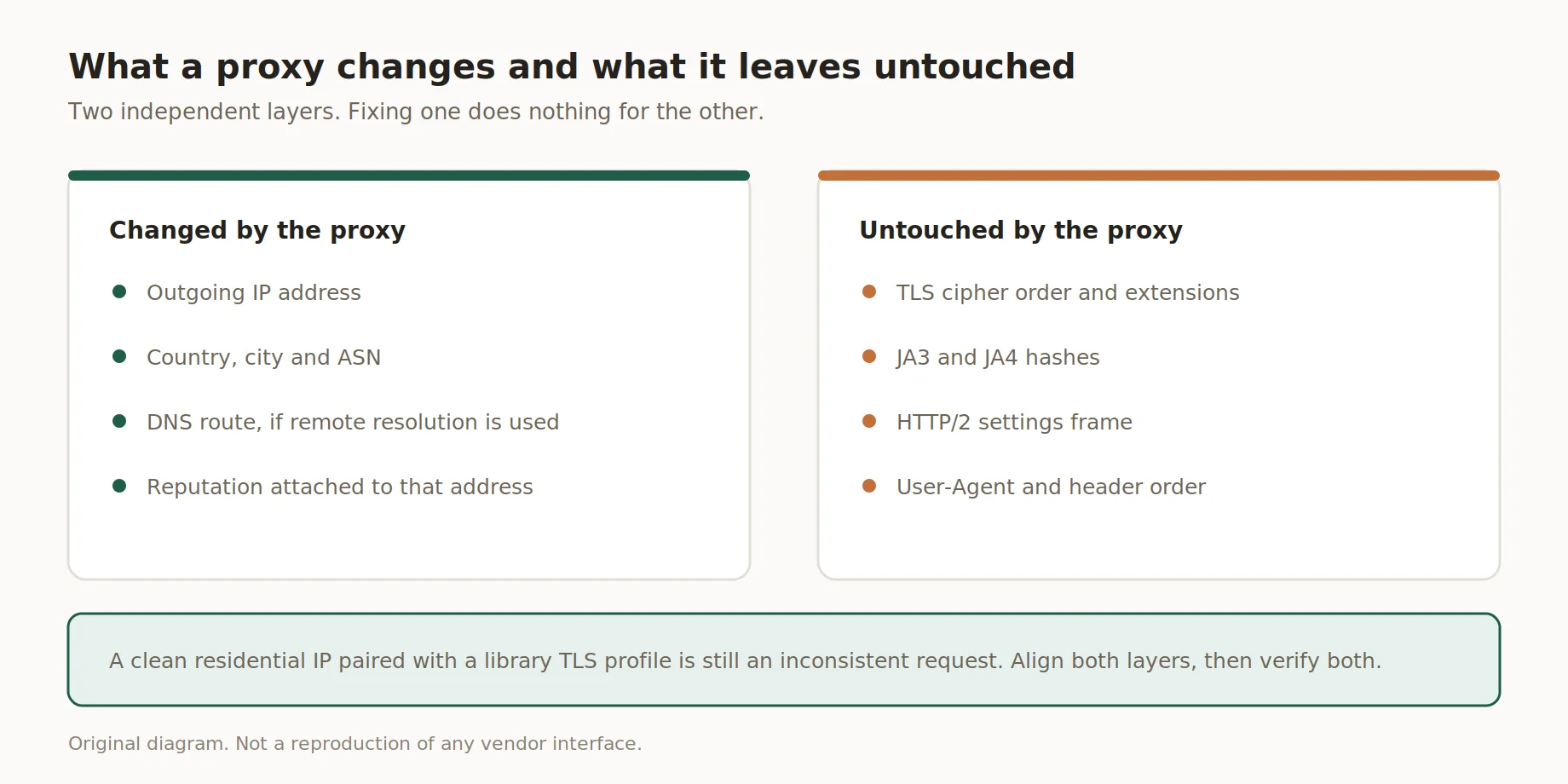
What a proxy changes and what it leaves untouched
- ✅ Matching a real browser's TLS stack is what actually changes the fingerprint.
How anti-bot systems use TLS fingerprints
Anti-bot systems compute a hash from every incoming ClientHello and check it against databases of known browser and bot fingerprints, then combine that signal with other layers before deciding on a block, challenge, or pass. TLS fingerprinting sits underneath HTTP headers entirely, which is why perfect headers alongside a scripted TLS stack still gets flagged. Cloudflare documents JA3 and JA4 fields inside its bot management product, and other vendors run comparable checks (Scrapfly, 2026). The scoring blends TLS signals with request timing, IP reputation, and behavioral data rather than relying on one field alone.
Some vendors add http2 fingerprinting on top of the handshake check, reading how a client negotiates stream priorities and window sizes once the TLS layer is done. This second layer feeds into broader anti bot detection scoring alongside the JA3 and JA4 hash. Vendors keep these databases updated as browser versions ship, and a fingerprint that passed last quarter can start failing after a browser update changes its defaults.
| Signal | What it reveals | Typical action |
|---|---|---|
| JA3 hash mismatch vs User-Agent | Claimed browser doesn't match TLS stack | ⚠️ documented with limits, often a challenge |
| Static hash across sessions | Same script reused repeatedly | ⚠️ documented with limits, rate limiting |
| Known bot database match | Fingerprint tied to a common library default | ❌ not offered, frequently blocked outright |
| Consistent browser-like profile | Matches expected browser behavior | ✅ documented, typically passes |
Consistency across layers: TLS, HTTP/2, headers and IP
Consistency across layers means the tls handshake, the http2 settings frame, the declared User-Agent, and the IP's network type all need to point toward the same story, a real browser or a real client, not a patchwork of mismatched signals. Http2 fingerprinting looks at how a client negotiates stream priorities and window sizes after the handshake completes, and it's a second layer some anti-bot vendors check alongside JA3 and JA4 data (Scrapfly, 2026). A scraper that fixes its TLS stack but ignores HTTP/2 settings still leaves an obvious gap.
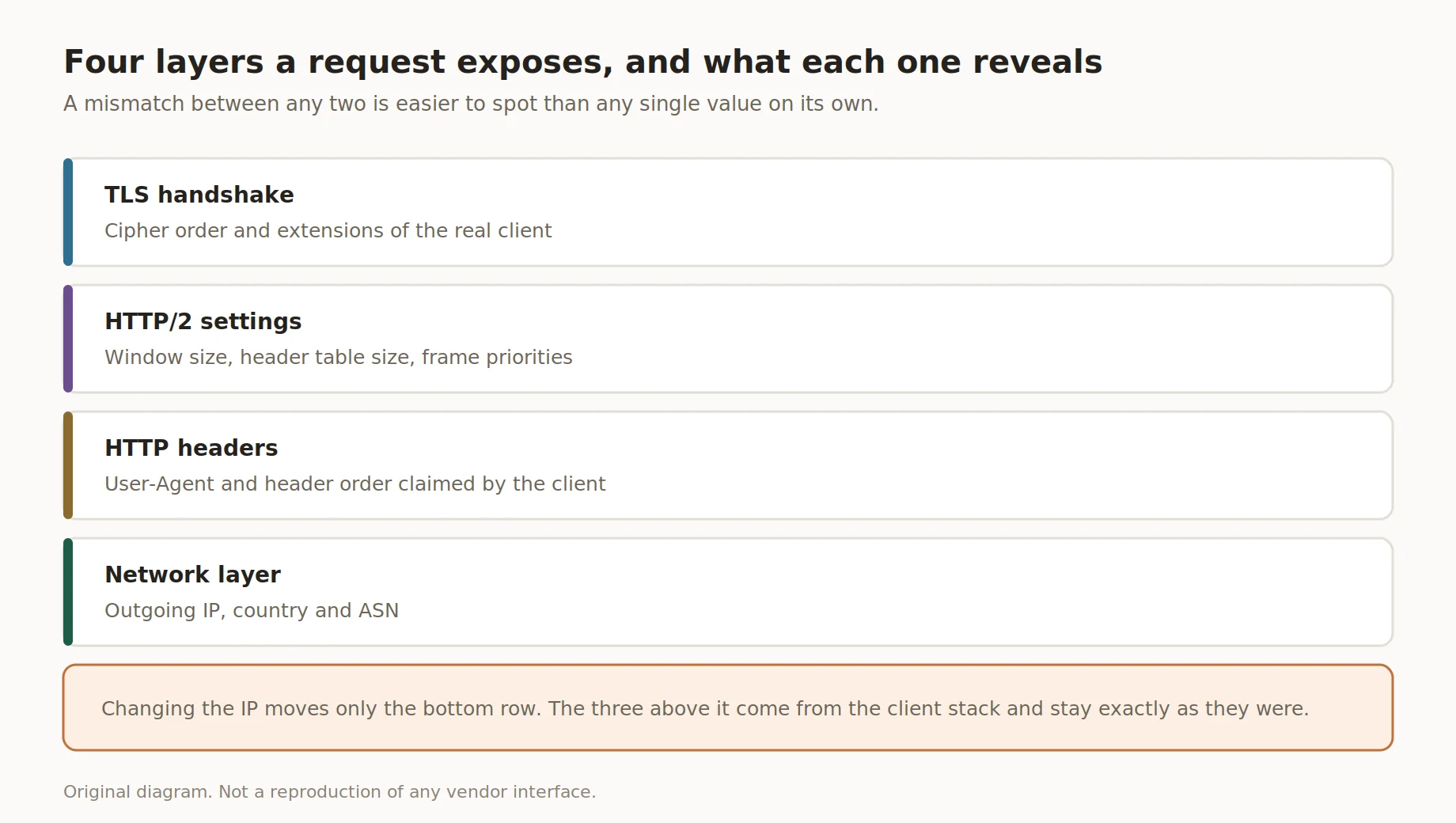
Four layers a request exposes, and what each one reveals
User agent consistency matters too, since a User-Agent string claiming Chrome 124 paired with an outdated JA4 fingerprint profile reads as a contradiction on its own. Anti-bot vendors flag exactly this kind of mismatch even when every individual header looks correct. None of these checks require bypassing anything on the target site; they just confirm that a client's own signals agree with each other before a request goes out.
| Layer | What must match | How to check |
|---|---|---|
| TLS handshake | Cipher suite and extension order for the claimed browser | Compare JA3/JA4 hash to a known browser sample |
| HTTP/2 settings frame | Window size, header table size, stream priority | Inspect frame values against browser defaults |
| Headers | User-Agent, Accept-Language, Sec-CH-UA if present | Manual review or a header inspection tool |
| IP/network | ASN type matches the claimed client, residential vs datacenter | Check IP reputation and ASN lookup |
How to test your own TLS fingerprint
Testing a fingerprint starts with a clean request to a checking endpoint, then a side-by-side comparison against a real browser hitting the same endpoint. A JA4 fingerprint groups TLS version, cipher count, extension count, and the first ALPN value into a readable string, which makes visual comparison easier than reading a raw hash (Scrapfly, JA3/JA4 fingerprint tool, 2026). Running the same test twice on different days also helps confirm the result stays stable across library updates.
Tools built for this, including Scrapfly's own checker and third party libraries like curl impersonate, a tool name used here only for identification, exist specifically to make this comparison possible without guesswork. A headless browser running Playwright or Puppeteer gives a genuine handshake for comparison too, since it launches a real browser engine rather than a scripted TLS stack.
- Step 1. Send a request from the client under review to a fingerprint testing endpoint and record the hash it returns.
- Step 2. Open the same endpoint in a real, current browser and note its own hash for comparison.
- Step 3. Compare cipher suites, extension counts, and the ALPN value side by side rather than judging by hash match alone.
- Step 4. Check whether the declared User-Agent header lines up with the TLS profile actually observed.
- Step 5. Log the result with a date, since the hash can shift after a library or browser update.
👉 Want to see how a properly configured client behaves end to end? Try a demo with Insocks before running a full test batch.
White-hat practices for stable data collection
White-hat data collection starts with the target site's own rules: official APIs first, robots.txt respected, and request rates kept well under anything that could strain a server. Revisiting what is JA3 helps explain why full browser engines, not header tricks, tend to produce the most stable results, since a real browser's TLS stack already matches its own declared identity by default. Playwright, Puppeteer, and Selenium all launch genuine browser engines, so their handshake looks like Chrome or Firefox without any extra configuration (Scrapfly, 2026).
Some teams reach for curl impersonate or similar libraries when a full browser is too heavy for the task at hand, and that's a reasonable trade-off as long as the resulting fingerprint gets tested against a real browser first. Pairing either approach with sensible timing and a clear User-Agent keeps a collection process predictable and easy to audit later.
- ✅ Use official APIs and documented endpoints wherever they exist.
- ✅ Respect robots.txt and the target site's published terms.
- ✅ Space out requests instead of firing bursts against one endpoint.
- ✅ Prefer full browser automation over piecemeal header or TLS spoofing.
- 💡 A slower, steady collection schedule usually causes fewer support tickets than a fast, bursty one.
By using this approach from the United States, a team confirms its collection process stays within current US legislation and the target site's own terms of service.
Common mistakes
A few process mistakes show up again and again when teams check their own setup. Testing once and never repeating the check after a library update is the most common one, since TLS fingerprinting results can shift the moment a dependency bumps its TLS backend. Running the test in a staging environment that doesn't match production is another, because the actual request path is what matters, not a local shell.
- ❌ Testing once and assuming the result stays valid forever.
- ❌ Checking fingerprints in an environment different from where the task actually runs.
- ❌ Trusting a single verification service without a second comparison point.
- ❌ Ignoring HTTP/2 settings while only chasing the TLS layer.
How proxy quality fits into the picture
Disclosure: Insocks is our service, and this section describes what proxy infrastructure actually does within a wider collection stack. Good proxy infrastructure fixes IP-layer problems: geography, IP reputation, and connection stability, while TLS fingerprinting remains a separate layer that a proxy alone cannot touch. Reliable uptime and clean IP pools matter for avoiding IP-based rate limits, but they say nothing about cipher suite order or extension lists inside a handshake.
For collection work we sell residential proxies and static IP proxies, both with documented protocol support and location data. Combining solid proxy infrastructure with a properly configured client, whether that's a full browser engine or a carefully matched library, addresses both layers at once instead of leaving one exposed.
| Feature | What it means in practice |
|---|---|
| Residential and ISP IP pools | Reduces IP-based reputation flags, doesn't touch TLS |
| Geographic targeting | Matches request origin to the intended market |
| Session control | Keeps IP consistent across a multi-step flow |
| Uptime and support | Reduces connection failures unrelated to fingerprinting |
Proxies address the network layer, not the TLS fingerprint, and any provider suggesting otherwise is overselling what an IP change can do. Teams that need both layers solved typically pair quality proxy infrastructure, like Insocks residential and ISP proxies, with a browser-based or properly matched client.
🔗 Register for full access to compare proxy pools before committing to a plan.
Key takeaways
- The tls handshake gets read before any HTTP header, and that's the whole basis of this detection method.
- The successor hash to JA3 stays stable even after extension order gets randomized, unlike its predecessor.
- Understanding what is JA3 clarifies why browser-like clients pass checks more consistently than scripted ones.
- Proxies solve IP problems; they never rewrite a tls handshake on their own.
- Full browser automation remains the most dependable route to a consistent, browser-like JA3 fingerprint.
Disclosure and data sources
All data in this article, including prices, tariff tiers, limits and product availability, is accurate as of the publication date shown on this page. Vendor terms change frequently and without notice, entry tiers move with volume, and promotional pricing may apply on the day you read this. Nothing here is an offer, a guarantee of current terms, or a recommendation to buy.
This article is published by Insocks. We sell proxies and disclose a commercial interest in the final section above. Proxies do not change a JA3 fingerprint or any other TLS signal, and we say so directly rather than implying otherwise. Testing tools and libraries mentioned here, including Scrapfly's checker, curl-impersonate, and browser automation frameworks, belong to their respective owners and appear solely for identification. Details in this piece were checked on August, 2026, and client behavior can shift between library or browser versions.
Frequently asked questions
The questions below cover the basics people usually ask after reading about this topic for the first time. Answers stay short and factual, matching what a browser tab or command line tool would actually show. None of this doubles as a bypass guide, since the goal here is understanding, not evasion.
What is a TLS fingerprint?
A short signature built from handshake data that identifies which software made a connection.
How is a JA3 hash calculated?
Five fields from the handshake get combined and hashed into a 32-character string.
What is the difference between JA3 and JA4?
The newer method sorts extensions and uses a stronger hash, staying stable after browsers randomize order.
Can a residential proxy hide my TLS fingerprint?
No, a proxy only changes the IP address; the handshake passes through unchanged.
Why does my scraper get blocked with correct headers?
Headers load after the handshake, so a mismatched client profile gets flagged first.
How do I check my own TLS fingerprint?
Send a request to a public checking tool and compare it against a real browser's result.