
SOCKS5 UDP support: why most proxy providers skip it
SOCKS5 UDP support means a proxy can relay UDP datagrams through the UDP ASSOCIATE command, not only TCP streams. Few providers enable it because datagram relaying costs more, is harder to meter and attracts abuse. Before you buy, ask for documentation, run a real UDP test through the relay and check port and session limits.
What UDP support in a proxy actually means
Real SOCKS5 UDP support means the proxy returns a relay port and passes datagrams both ways for as long as your session needs. A line on a pricing page is only a claim. The difference shows up the first time you route a VoIP call, a game client or a DNS tool through the proxy.
- ✅ Working support: the relay address is returned, replies come back, and the session holds for minutes rather than a few packets.
- ❌ Claimed support: "UDP" appears in a feature list, with no documentation, no port range and no way to test it.
💡 Treat UDP as unconfirmed until you see it work on your own traffic.
How UDP ASSOCIATE works in SOCKS5
UDP ASSOCIATE is the SOCKS5 protocol command that sets up a datagram relay next to a TCP control channel. The client requests an association over TCP, the server answers with a relay address and port, and datagrams then travel through that port with a small SOCKS header attached.
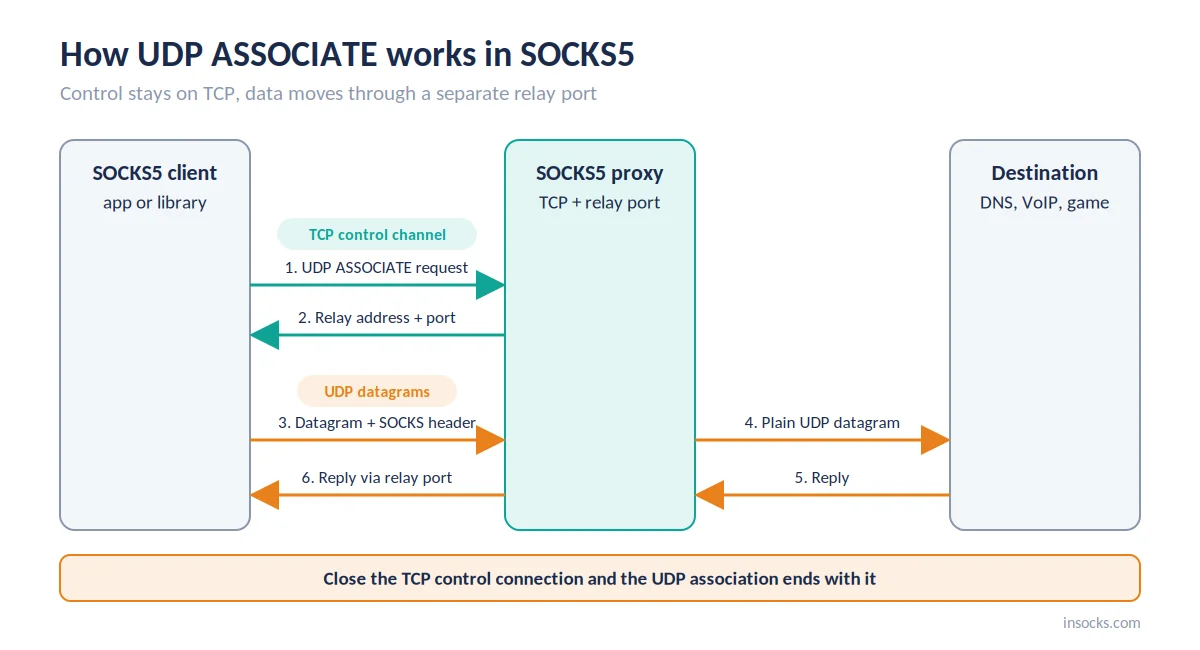
The client gets a relay port over TCP, then sends datagrams through it
CONNECT works differently: it opens one TCP stream to one destination, and that is all many proxy servers implement. The control connection still matters after setup, because the association lives only while it stays open.
"A UDP association terminates when the TCP connection that the UDP ASSOCIATE request arrived on terminates."
— RFC 1928, SOCKS Protocol Version 5
So a client that drops its idle TCP channel loses UDP along with it. Fragmentation is another weak spot: the spec makes it optional, and most servers simply drop fragmented datagrams, so keep payloads below the path MTU.
Why HTTP proxies cannot carry UDP
A classic HTTP proxy can't carry UDP, because its CONNECT method only opens TCP tunnels. That is the practical core of the SOCKS5 vs HTTP proxy question for real-time apps. CONNECT-UDP, a newer HTTP method from the IETF MASQUE work, does proxy UDP, but proxy providers rarely offer it yet.
| Protocol | UDP support | Notes |
|---|---|---|
| HTTP | ❌ No | Forwards web requests only |
| HTTPS (CONNECT) | ❌ No | TCP tunnel for TLS traffic |
| SOCKS4 | ❌ No | TCP only by design |
| SOCKS5 | ✅ If enabled | UDP ASSOCIATE is in the spec; each provider decides whether to turn it on |
| MASQUE CONNECT-UDP | ⚠️ Early stage | HTTP/3-based, rarely sold by proxy providers |
So if you're asking does SOCKS5 support UDP, the spec says yes, and it is the common proxy protocol you can actually buy with a datagram relay. Protocol details are on the SOCKS5 proxy page.
Why most providers disable UDP
Most providers switch UDP off because it costs more to run and is harder to control than TCP. Datagram bursts complicate per-GB billing, and every half-working relay turns into support tickets.
| Reason | Impact on the user |
|---|---|
| Traffic billed by GB | Unpredictable bills when voice or game traffic spikes |
| Abuse risk | UDP disabled on cheaper plans or entire pools |
| NAT and mobile pools | Sessions drop when carrier NAT remaps ports |
| Port restrictions | Some apps can't reach the ports they need |
| Infrastructure cost | UDP plans cost more or come with caps |
| Support load | Fewer providers offer help with UDP issues |
None of this makes UDP a bad feature. It explains why SOCKS5 UDP support is uncommon and why its limits deserve a close look.
Mobile pools are the hardest case. Carrier NAT can change the public port during a pause, so many providers offer UDP only on residential, ISP or datacenter IPs, where the exit address stays put.
Which tasks really need UDP
A task needs UDP when its protocol sends datagrams instead of streams. For these workloads, a UDP proxy is the reason to buy in the first place.
- VoIP calls, where RTP carries the audio
- Online games with real-time state updates
- DNS lookups sent as UDP packets to a chosen resolver
- QUIC and HTTP/3 traffic in apps that can route it through SOCKS5
- WebRTC calls and browser conferencing
- IPTV and other UDP-based video delivery
- Media stream monitoring, where packet loss and jitter are the metrics
Example: a VoIP QA team
A US contact-center software vendor tests call quality from several states before each release. Signaling worked through their HTTPS proxies, but audio never arrived, because RTP runs over UDP. Moving the test rig to a UDP proxy with documented UDP ASSOCIATE let the team measure jitter and packet loss per region instead of guessing.
Which tasks do not need UDP
Public data collection, SERP tracking, e-commerce price checks and API calls run over HTTP or HTTPS, which means TCP. A UDP-capable plan adds nothing to them. Not sure about your own app? Capture its traffic for a minute: if the only UDP packets are ordinary DNS lookups, TCP is enough.
💡 If your workload never sends a datagram, skip paying for UDP. A standard residential proxy covers scraping and API work.
How to verify a UDP support claim step by step
You can check a UDP claim in about ten minutes, as long as your client really implements UDP ASSOCIATE. Do it before committing to a UDP proxy plan.
- Read the docs. Look for an explicit mention of UDP ASSOCIATE and the allowed port range.
- Pick a UDP-capable SOCKS5 client. curl and browser proxy settings use CONNECT only, so they can't test UDP.
- Send a real datagram. Query a public DNS resolver over UDP through the relay and confirm the answer comes back the same way.
- Measure quality. Run a short latency measurement and packet loss check with traffic close to your real workload.
| What to check | Expected result |
|---|---|
| Docs mention UDP ASSOCIATE | Explicit statement plus port range |
| Association request | Server returns a relay address and port |
| DNS query over UDP | Answer arrives through the relay |
| Packet loss | Below 1% for voice and gaming |
| Latency | Stable, with no spikes every few minutes |
Run the same latency measurement once without the proxy and once through it. The difference is what the relay costs you. For voice, ITU-T G.114 treats up to 150 ms of one-way delay as acceptable for most calls, so compare your total against that budget rather than against zero.
Which ports and limits to check
Limits decide whether a relay survives real traffic. A SOCKS5 UDP relay that passes one quick test can still fail under load if sessions are tightly capped.
- ✅ Allowed ports: port restrictions break some apps without any clear error.
- ✅ Datagram limits: ask about maximum packet size and rate caps.
- ✅ Relay timeout: find out how long an idle association stays open.
- ✅ Concurrent sessions: check how many associations one IP can hold.
💡 If the relay timeout is short, have your app send a small packet every 15 to 20 seconds during silence, the same way softphones keep NAT mappings open.
Skipping these checks is how teams end up with UDP that works in testing and drops calls in production.
UDP, QUIC and HTTP/3: what changes
QUIC runs over UDP, yet most mainstream browsers don't send it through a SOCKS5 proxy. With a proxy configured, they typically fall back to HTTP/2 or HTTP/1.1 over TCP, regardless of what the provider supports.
The fallback is silent, so check the protocol column in your browser's developer tools before assuming HTTP/3 was measured. Apps that implement SOCKS5 UDP themselves can carry QUIC through the relay. If HTTP/3 performance is the goal of your test, use such a client, or label proxied browser results as HTTP/2 so nobody compares the wrong numbers.
Common mistakes when testing UDP support
Most "UDP doesn't work" reports trace back to the test setup, not to the provider. Rule these out before opening a ticket.
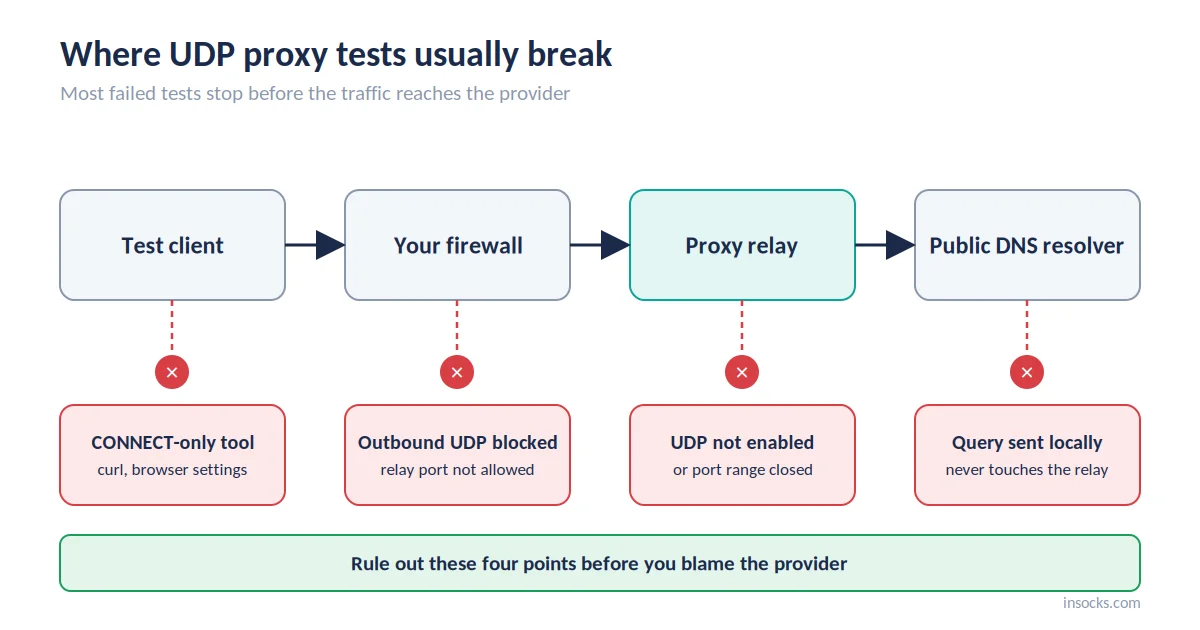
Client, firewall, relay and resolver: check each one in order
| Mistake | Cause | Fix |
|---|---|---|
| ❌ Testing with a CONNECT-only tool | The client never requests a UDP relay | Use a client that implements the UDP relay |
| ❌ socks5 instead of socks5h | Hostnames resolve locally, so DNS leaks | Use socks5h for remote DNS on TCP traffic; it doesn't test UDP |
| ❌ Local DNS left on during UDP tests | The query never touches the relay | Send the test query to a public resolver through the relay |
| ❌ Closed port on your side | Your firewall drops relay traffic | Allow outbound UDP to the relay port |
What to ask a provider before you buy
Five questions reveal most of what a pricing page leaves out, and a vague answer tells you something too. Ask them before paying for a proxy with UDP support.
- ✅ Is UDP ASSOCIATE implemented, and where is it documented?
- ✅ Which pools support it: residential, ISP, datacenter, mobile?
- ✅ Which ports are open for relay traffic?
- ✅ Is UDP billed per IP, per GB or separately?
- ✅ Can I test it on a demo first?
What a good answer looks like
A solid reply names the command, lists pools and ports, explains billing in one sentence and offers a test. For reference, Insocks supports SOCKS5 UDP on all proxy types except mobile and bills per IP, from $0.40 for a 24-hour SOCKS5 proxy.
Why a SOCKS5 provider with real UDP support wins
A provider with working SOCKS5 UDP support covers workloads that TCP-only proxies can't, and clear documentation saves days of trial and error.
| Feature | Benefit |
|---|---|
| Working datagram relay | VoIP, gaming and WebRTC run without silent fallback |
| Documented ports and limits | Predictable setup and fewer failed tests |
| Remote DNS support | No local DNS leaks on TCP traffic |
| Per-IP pricing | No surprise bills from datagram bursts |
| Free demo | Relay tested before you pay |
👉 Try demo proxies to test the UDP relay on a live pool, then register for full access or buy a UDP proxy once the numbers look right.
Key takeaways
- SOCKS5 is the common proxy protocol with UDP in its spec, via UDP ASSOCIATE.
- Advertised SOCKS5 UDP support and working support are not the same thing.
- VoIP, gaming, WebRTC and UDP DNS tools need it; scraping and APIs don't.
- socks5h handles remote DNS for TCP and proves nothing about UDP.
- Check ports, timeouts, session caps and billing before you buy.
Frequently asked questions
Does SOCKS5 support UDP by default?
The protocol defines UDP ASSOCIATE, but each provider decides whether to enable it.
Why does my SOCKS5 proxy fail on UDP traffic?
Usually the provider hasn't enabled UDP relaying, your client doesn't support it, or a port is blocked.
Can an HTTP proxy handle UDP?
A classic HTTP proxy can't, because CONNECT only opens TCP tunnels.
How do I test if a proxy supports UDP ASSOCIATE?
Use a SOCKS5 client that supports UDP relaying, send a DNS query over UDP through it and confirm the reply returns.
Do I need UDP support for web scraping?
No, scraping and API requests run over TCP.
Does UDP support make a proxy faster?
No, it only lets UDP-based apps work through the proxy at all.
Using proxies, you confirm that you apply them within current US law. Insocks is built for lawful business use in the United States. More guides are in the Insocks blog.