
CGNAT and UDP: how carrier-grade NAT affects real-time traffic
Carrier-grade NAT (CGNAT) lets a carrier place thousands of subscribers behind a small pool of public IPv4 addresses, and nearly every mobile IP sits behind it. For UDP this matters: mappings live on idle timers, inbound connections fail, and a short pause can change your public port in the middle of a call.
What is carrier-grade NAT (CGNAT)
What is CGNAT? It's address translation run by the ISP or mobile carrier instead of your home router. It shares each public IPv4 address among many customers and assigns them addresses from 100.64.0.0/10, the shared address space reserved for this purpose in RFC 6598.
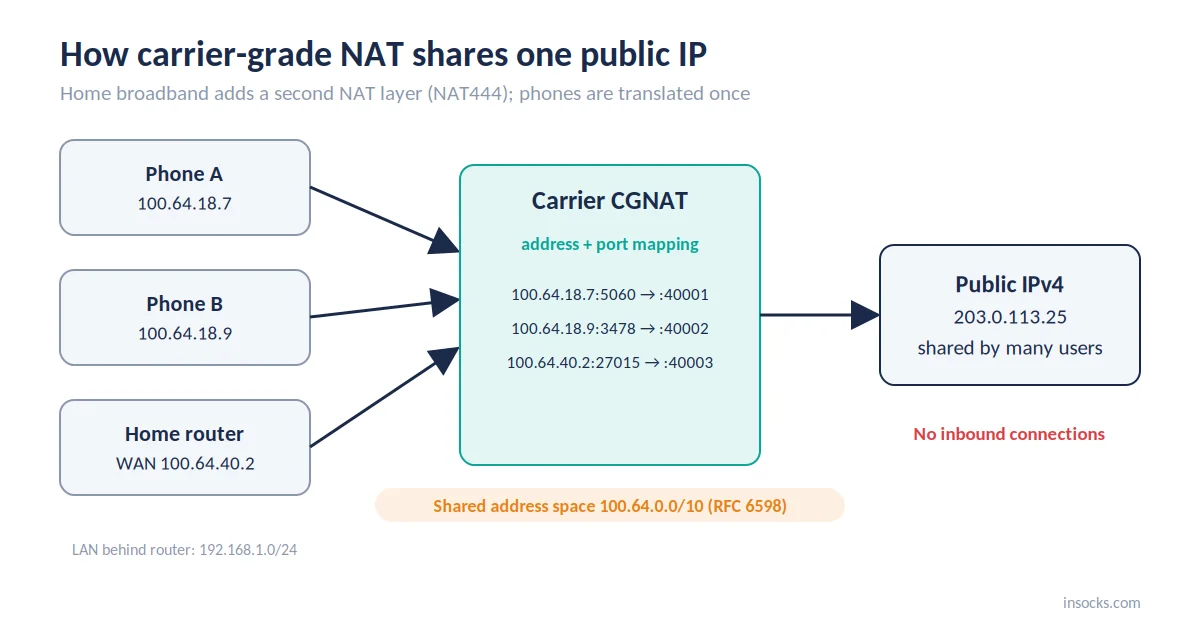
The carrier maps each subscriber's address and port to a shared public IP
- Home NAT: one household behind one public IP, with port forwarding under your control.
- CGNAT: many subscribers behind one public IP, with no port forwarding for anyone.
- NAT444: the broadband setup where your router translates once and the carrier translates again, across three IPv4 address realms.
Phones usually have no router in between, so the carrier gateway translates their address only once.
Why mobile networks rely on CGNAT
Mobile carriers adopted Carrier Grade NAT because IPv4 addresses ran out long ago and phones far outnumber the addresses a carrier owns. One public IP can serve thousands of subscribers, as long as each connection gets its own port.
Most people typing "what is CGNAT" into a search bar are really asking about scarcity. Many carriers already give phones IPv6, but anything that still needs IPv4 goes through the translator.
What changes for an outgoing connection
Behind CGNAT, every outgoing connection leaves from a shared address and a port the carrier picks. Replies get back only while the gateway remembers that pairing, and nothing outside can start a connection toward you.
| What changes | Why it matters |
|---|---|
| Shared public IP | Remote servers see many users behind one shared IP address |
| Address plus port mapping | The carrier's port allocation, not your device, identifies the session |
| Session state | Mappings are temporary and expire |
| No inbound path | Unsolicited connections from outside are dropped |
CGNAT UDP problems start here: TCP has explicit open and close signals, while UDP has none.
How CGNAT handles UDP mappings
A CGNAT UDP mapping is created by your first outgoing packet and removed after a stretch of silence. With no handshake to follow, the NAT timeout alone decides how long it lives.
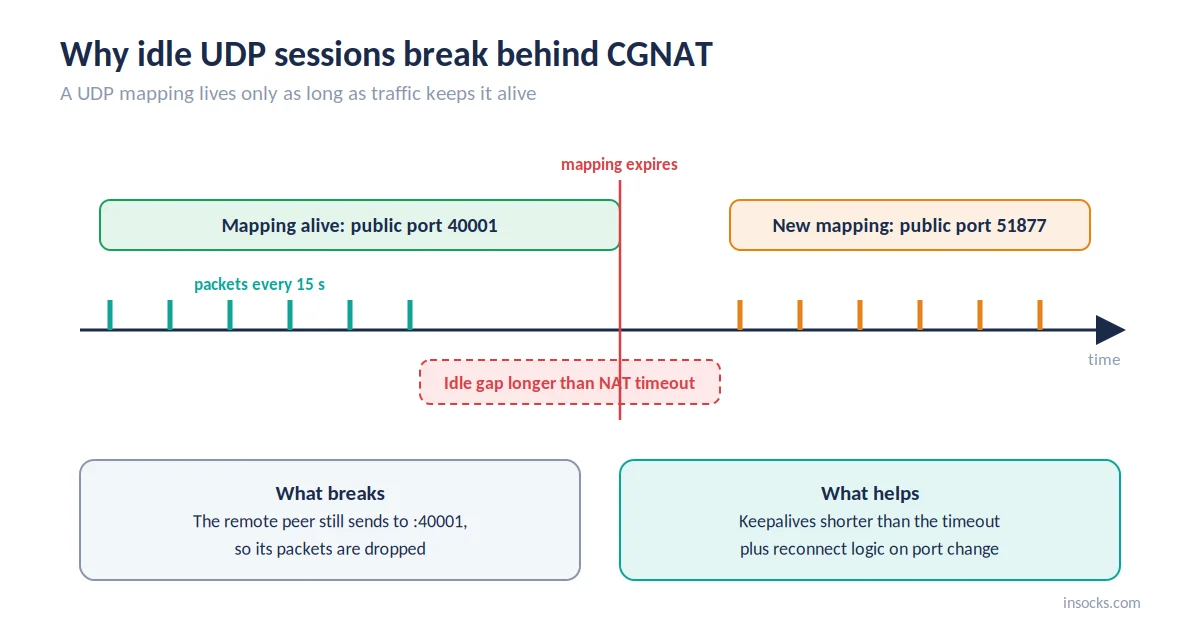
Traffic keeps the mapping alive; a long silence can change the public port
Well-behaved gateways use endpoint independent mapping (EIM): the same internal address and port keep the same public address and port for every destination. That helps peer-to-peer apps, since a port learned from one server works with others.
"A NAT UDP mapping timer MUST NOT expire in less than two minutes, unless REQ-5a applies."
— RFC 4787, IETF best current practice for NAT UDP behavior
Not every network follows it, so applications shouldn't count on the two-minute floor.
Why inbound connections and port forwarding do not work
Inbound connections fail because the gateway only forwards packets that match a mapping your device created. Port forwarding needs a public port reserved for you, and on a shared address every port belongs to the carrier's pool.
- ✅ Outgoing requests and their replies
- ✅ Established sessions that keep sending traffic
- ❌ Unsolicited inbound connection attempts
- ❌ Manual port forwarding on a shared address
Port Control Protocol (PCP) lets a device request a mapping from the carrier, but few carriers expose it to subscribers. Apps that must accept connections usually rely on an outside relay server instead, which the device connects to first.
How CGNAT affects real-time traffic
Real-time apps hit CGNAT UDP limits first, because they need steady two-way delivery. A lost mapping shows up immediately as clipped audio, frozen video or a desync.
| Traffic type | CGNAT impact | What helps |
|---|---|---|
| VoIP | One-way or missing audio after a remap | Keepalives shorter than the NAT timeout |
| Video calls | Freezes while the path is renegotiated | ICE restart with TURN fallback |
| Online games | Lag spikes and disconnects | Short idle gaps, quick reconnects |
| IPTV over UDP | Stream stalls after a pause | Client keepalives or HTTP-based delivery |
| WebRTC | Direct peer links fail on strict NATs | TURN relay when direct paths fail |
Shared IP reputation and rate limits
A shared carrier address carries the combined history of everyone behind it. When one subscriber misbehaves, rate limits and checks can reach everyone else on that address.
Large platforms know which ranges belong to carriers and often set looser thresholds, since blocking one address would lock out many real users. Busy gateways still see extra captchas and throttling, a direct side effect of Carrier Grade NAT. That is why IP reputation on mobile pools changes quickly.
How to check if you are behind CGNAT step by step
Compare the WAN address your router or phone reports with the public IP a website sees. If they differ and the WAN address is in a shared or private range, your carrier is translating it.
- Find the WAN address. On broadband, open the router admin page and note its WAN or Internet IP. On a phone, check the cellular IP in network settings.
- Find the public IP. Open any "what is my IP" page on the same connection.
- Compare them. Identical addresses mean no carrier NAT on that link.
- Check the range. A WAN address inside 100.64.0.0/10 points to CGNAT; a 10.x.x.x address on mobile usually does too.
If "what is CGNAT" brought you here after a failed port forward, these steps settle it in a few minutes.
| What to check | Expected result behind CGNAT |
|---|---|
| WAN IP vs public IP | Different addresses |
| WAN IP range | 100.64.0.0/10, or a private range on mobile |
| Inbound test to the public IP | Fails, though a firewall can cause this too |
Comparing a device's local Wi-Fi address with the public IP proves nothing, since home NAT alone makes them differ.
How mobile proxies work on top of CGNAT
A CGNAT mobile proxy sends traffic out through a real carrier gateway, so it inherits that carrier's NAT behavior. Sticky sessions keep one exit IP for a set time; rotating sessions switch it on a schedule or per request.
Even a sticky session can change mid-task: the carrier rebalances gateways, the device reconnects, or an idle mapping expires. A mobile proxy suits checks that must come from carrier IPs. For UDP-heavy work, note that many providers, Insocks included, don't offer UDP on mobile pools.
How to keep sessions stable on mobile IPs
Stable CGNAT UDP sessions on mobile IPs depend on traffic timing and reconnect logic. Send small packets before the mapping expires, and let the app recover when the public port changes.
- ✅ Keep the keepalive interval below the shortest NAT timeout you expect; ICE, used by WebRTC, defaults to 15 seconds.
- ✅ Detect a new public IP or port and re-register instead of waiting on the old one.
- ✅ Design sessions to be short and resumable.
- ❌ Waiting for inbound traffic that never arrives.
- ❌ Hard-coding one external IP in allowlists or app logic.
💡 Log the public IP and port on every reconnect. The pattern reveals the real timeout of the carrier you're on.
Example: a softphone on mute
A telehealth team saw mobile calls go silent after about a minute on mute. Logs showed the public port changing during the pause, because a muted client sent no audio packets. A 15-second keepalive and re-registration on port change fixed it without touching the network.
Common mistakes with CGNAT and mobile IPs
Teams new to a CGNAT mobile proxy setup often treat a mobile IP like a dedicated server address. The fixes belong in application logic, not in the network.
| Mistake | Impact | Fix |
|---|---|---|
| ❌ Expecting inbound connections | Requests never reach the device | Design outbound-only flows or use a relay |
| ❌ Long idle gaps in a UDP session | Mapping expires mid-session | Send keepalives on a fixed interval |
| ❌ Tying logic to one external IP | Sessions break on reassignment | Handle IP and port changes in code |
When mobile IPs fit and when ISP or datacenter is better
Choose mobile IPs when a test must show what carrier users see. Choose ISP or datacenter IPs when you need long sessions, high throughput or UDP, since mobile exits always sit behind Carrier Grade NAT.
| Task | Best IP type | Why |
|---|---|---|
| Mobile ad verification | Mobile | Shows the ads carrier users are served |
| Mobile site and app QA | Mobile | Reproduces real carrier network conditions |
| Large public data collection | Datacenter or ISP | Fast, stable and cheaper per request |
| VoIP and real-time testing | ISP | Predictable latency, fewer remaps, UDP support |
| Long monitoring sessions | Static ISP | One address for days |
For long sessions, compare ISP proxy and static proxy plans.
Choosing a proxy that handles real-time traffic
For CGNAT UDP workloads, session persistence and UDP support matter more than headline speed. Check how long sessions hold, which pools carry UDP and how clearly limits are documented.
| Feature | Benefit |
|---|---|
| Sticky session control | One exit for the length of a test |
| SOCKS5 with UDP support | VoIP and game traffic run through the proxy |
| ISP and static pools | Fewer remaps than mobile gateways |
| Mobile carrier network coverage | Realistic carrier-side checks |
| Free demo | Stability measured before you buy |
👉 Try demo proxies, register for full access, or buy a UDP proxy once your tests hold up.
Key takeaways
CGNAT UDP behavior explains most of the friction real-time apps meet on cellular networks. Here is the short answer to "what is CGNAT" and why it matters.
- CGNAT shares public IPv4 addresses across many subscribers through address and port mapping.
- UDP mappings live on idle timers, so pauses can change your public port.
- Inbound connections and port forwarding don't work on shared carrier addresses.
- Keepalives and reconnect logic keep real-time sessions stable.
- Mobile proxies inherit carrier NAT; ISP pools suit long sessions and UDP.
Frequently asked questions
What is carrier-grade NAT in simple terms?
It's NAT run by your carrier, letting many customers share one public IPv4 address.
Does CGNAT block UDP traffic?
No, but it removes idle UDP mappings, so quiet sessions can break.
Why do inbound connections fail on mobile IPs?
The gateway only forwards traffic for connections your device started.
How do I know if my connection uses CGNAT?
Compare your router's or phone's WAN IP with your public IP; a mismatch plus a 100.64.0.0/10 or private WAN address points to CGNAT.
Do mobile proxies work behind CGNAT?
Yes, they exit through carrier gateways and follow the same NAT rules.
Does CGNAT affect latency?
Usually only slightly, though traffic may take a longer route through centralized carrier gateways.
Using proxies, you confirm that you apply them within current US law. Insocks is built for lawful use in the United States. More guides are in the Insocks blog.